

Graph Studio splits design work across the canvas, toolbar, node drawer, and the left sidebar — including graph-scoped assets (versions, builds, cards, triggers, tools, integrations).

Layout at a glance

GitHub graph with Graph assets sidebar

Graph Studio — canvas, sidebar Graph assets, and toolbar

Canvas

  • React Flow surface — pan, zoom, arrange nodes from the node library.
  • Drag handles to create connections.
  • Bottom controls: With Prompt / view mode, lock, fit, organize, zoom, undo/redo.
  • Status footer shows block count (legacy label), intents count, last saved, and ⌘ + S Save.

Toolbar

See Publishing and Expose as A2A.

Node drawer (inspector)

Double-click a Master or Child agent to open the inspector. Tabs: Details, RAG, Tools, Variables. Full tab walkthrough: Node library — Configure Master / Child.
Master Agent Details tab

Node drawer — Details

Graph-level sidebar (Graph assets)

When a graph is open, the left nav shows GRAPH ASSETS — scoped to that graph (?tab= in the Studio URL). These manage assets for the current Agent Graph.

Graph Versions

Saved design snapshots of the canvas (prompts, nodes, edges) — separate from immutable Agent Builds.

Agent Builds

Immutable snapshots of graph + published tools (+ RAG). The panel shows:
  • Environment assignments — which build is on DEV, UAT, PROD
  • Build rows — description, tool count, RAG count, timestamp
  • Actions — Build, Assign, Test build, View build details
Agent Builds sidebar

Agent Builds — DEV / UAT / PROD and build history

After a build exists, toolbar Deploy unlocks. See Publishing.

Agent Cards

Graph-scoped A2A registry view — Active deployments, version list, or empty until Deploy → Deploy as A2A.
Agent Cards sidebar

Agent Cards — Active deployments

See Agent Cards.

Triggers

Lists triggers attached to this graph. Configure payloads under Triggers.
Triggers asset panel

Triggers — graph-scoped list

Integrations

Integrations Hub connections used by this graph. Manage credentials in Integrations Hub.

Tools

Graph-level inventory of tools on the canvas. Author tools in Tools & Dev Studio; attach from the node drawer (Add a new tool).

Workspace sidebar (above Graph assets)

Variables

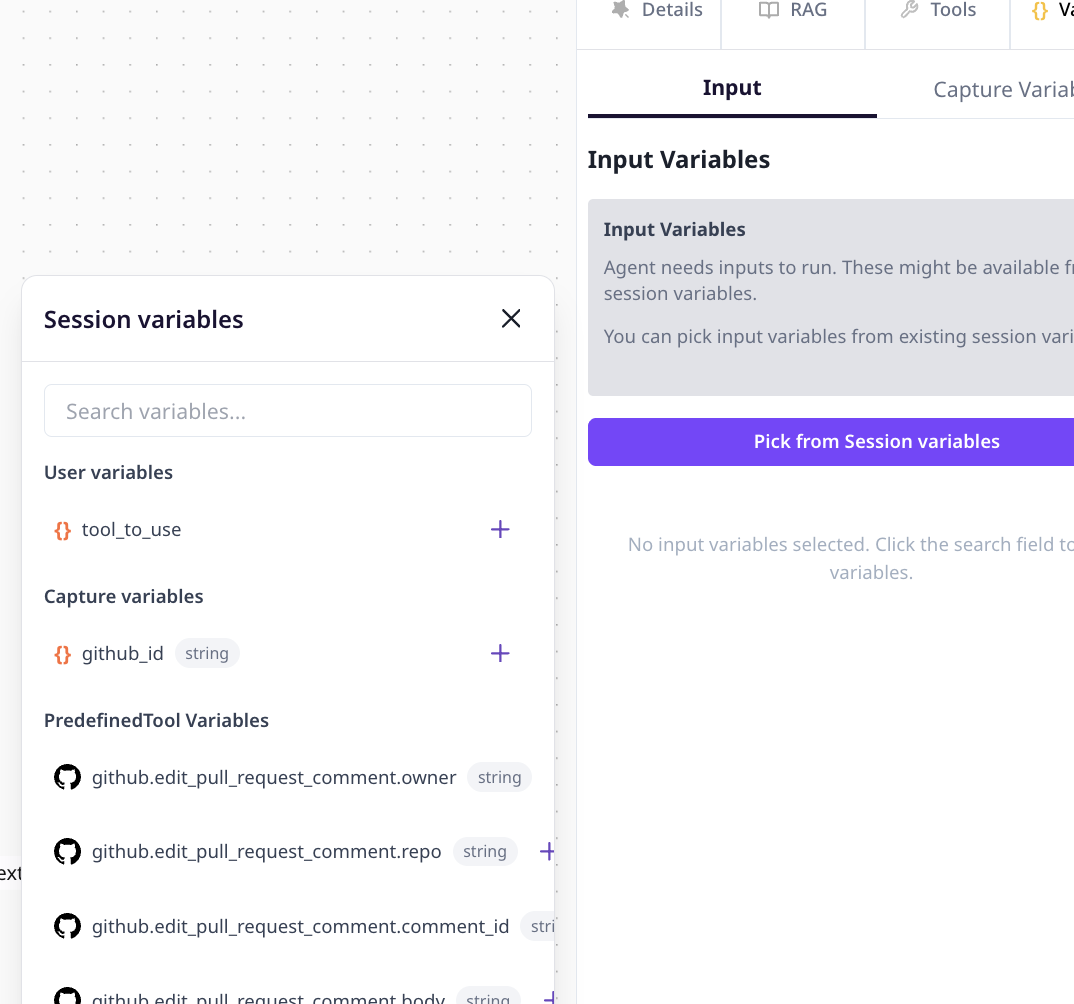
Variables carry state through an Agent Graph at three layers: graph schemas, per-node input/capture, and runtime session values.
Capture Variables on an agent node

Node drawer — Capture Variables

Input and capture

  1. Double-click a Master or Child agent → Variables tab.
  2. Under Input Variables, use Pick from Session variables to map values.
  3. Under Capture Variables, click Create a variable for each field to extract.
  4. Save the graph.

Session variable types

Environment secrets belong in Env. variables, not graph variable definitions.
Variable chips also appear on agent nodes on the canvas. Runtime inspection: Variable capture logs.

RAG

RAG grounds agent answers in your documents and structured data.

Create collections

  1. Open workspace RAG Data.
  2. Create a data source and add documents or structured items.
  3. Index collections before attaching to graphs.
Supported sources include PDF, CSV, text, datasets, and API-connected endpoints.
RAG Data workspace page

Workspace RAG Data — collections

Attach to an agent node

  1. Select an agent node → RAG tab.
  2. Use Attach Files or select data source items for this step only.
  3. Save the graph.
RAG tab on agent node

Node drawer — RAG tab

Attach only collections relevant to each step — narrower retrieval improves answer quality.
Attached RAG lists save with the graph version and pin on Build. See Publishing.