

Capture Variables
Capture Variables are automatically captured by the Agent during execution based on the description you provide. The Agent identifies and stores relevant information as the workflow progresses.Tool-Returned Capture Variables
These variables are returned by tools during execution, including both custom and predefined tools. For custom tools, simply return the variables in thecapture_variables dictionary, and they will be automatically stored as session variables(each key stored as seperate session variable).
User Variables
User Variables are defined in the API payload before executing an autonomous or conversational flow. These allow you to pass initial data into your workflow.System Variables
The following system variables are automatically set in every session:workflow_id- A unique identifier assigned to each workflow executioncaller_number- Available during voice calls, containing the caller’s phone number
Predefined Tool Variables
When using predefined tools, the entire output object returned by the tool is saved as a session variable.Example: Telegram Tool
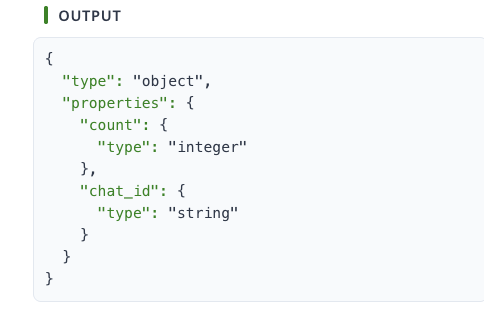
telegram.get_chat_member_count tool (from the Telegram integration), the complete output object is stored in the session and can be accessed using dot notation:
Using in Custom Tools
You can access these variables in your custom tools like this:The session variable name follows the pattern:
{tool_name}.{subtool_name}