> ## Documentation Index
> Fetch the complete documentation index at: https://docs.phinite.ai/llms.txt
> Use this file to discover all available pages before exploring further.
# Trigger APIs
> Autonomous trigger execution modes — API, background task, and cron.
Expose **Autonomous Agent Graphs** as callable endpoints. External systems or the platform scheduler invoke a pinned **Agent Build** per **DEV / UAT / PROD**.
**Conversational** graphs use [Channels](/channels/overview) and **Chat API** — not these Autonomous modes. See [Trigger types](/triggers-intents/overview#trigger-types).
## Execution modes
| Mode | Best for | Time limit |
| ------------------------- | ----------------------------------- | ------------------------------ |
| **API (single endpoint)** | Simple, fast runs | \~120–150 seconds |
| **Background task** | Multi-step graphs (**recommended**) | Up to 45 minutes |
| **Cron job** | Recurring platform schedules | No external caller after setup |
## Enable a trigger
1. Open **Integrations** → **Triggers** (or **Deploy** → **Deploy as API** / **Cron job** in Graph Studio).
2. Select **workflow type** — API, Background Task, or Cron Job.
3. Choose the **Agent Graph** and assign an **Agent Build** per environment.
4. Save — the platform generates URLs for each environment.
Map builds per environment on [Mapping triggers](/triggers-intents/mapping).
## Authentication
All HTTP trigger requests require a workspace **Bearer Token**:
```bash theme={null}
Authorization: Bearer
```
Test in **DEV** before promoting build assignments to **PROD**. Sample requests: [API usage examples](/triggers-intents/api-usage-examples).
***
## API mode (single endpoint)
Synchronous execution — the call waits for the graph to finish and returns the result.
```text theme={null}
POST https://app.phinite.ai/api/v1/ai/trigger/{workspace_id}/{trigger_id}/{environment}
```
```json theme={null}
{
"message": "",
"user_variables": {"key1": "value1", "key2": "value2"}
}
```
| Field | Description |
| ---------------- | ---------------------------------------------------- |
| `message` | First message when the session starts (can be empty) |
| `user_variables` | Session variables available throughout the run |
Response `status` is `completed` or `failed` with `workflow_id`, `response`, and `logs`.
Not recommended for complex graphs. Use **Background task** for longer work.
***
## Background task mode (recommended)
Asynchronous **start** + **status** endpoints.
### Start
```text theme={null}
POST https://app.phinite.ai/api/v1/ai/trigger/start/{workspace_id}/{trigger_id}/{environment}
```
Returns `workflow_id` with `status: "pending"`.
### Status
```text theme={null}
GET https://ai-core.phinite.ai/trigger/status/{workspace_id}/{workflow_id}
```
| Status | Meaning |
| ----------- | ------------------------------------------------ |
| `pending` | Still running — response includes recent logs |
| `completed` | Finished — `response` contains session variables |
| `failed` | Error — see `error` field |
Poll until `completed` or `failed`. Implement retries with backoff on the caller side.
***
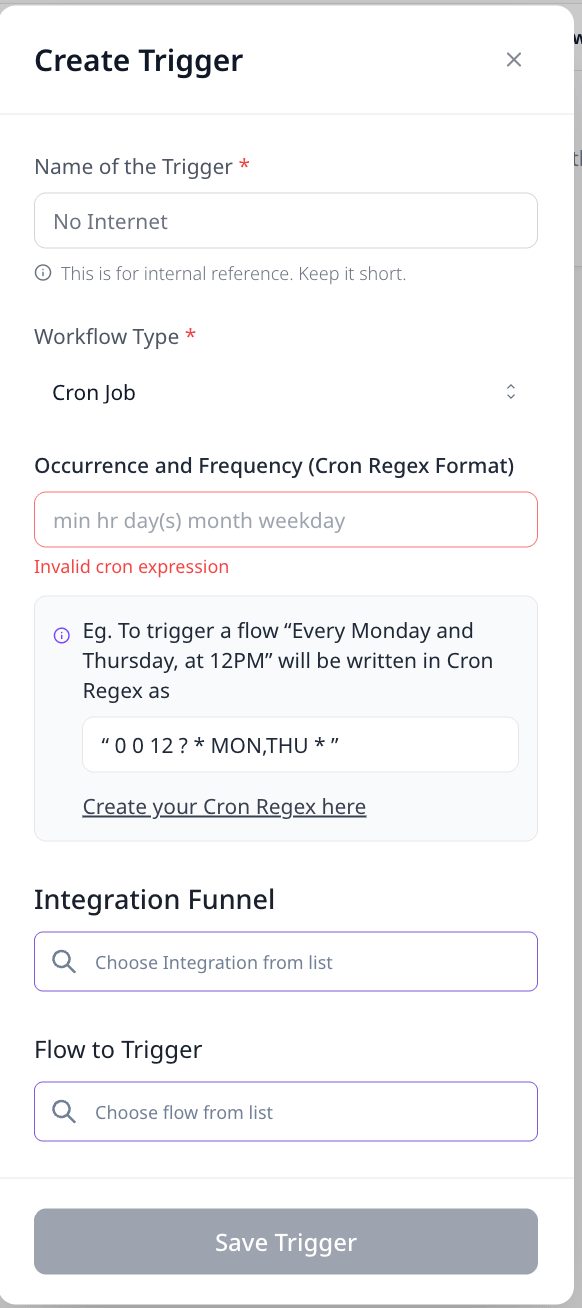
## Cron job mode
Runs on a schedule inside Phinite — no external HTTP caller after configuration.
1. **Save** the graph and create an **Agent Build**.
2. **Integrations** → **Triggers** → **Cron** (or Studio **Deploy** → **Cron job**).
3. Set the cron expression and default **message** / **user\_variables**.
4. Assign builds per environment; confirm runs in [Observability logs](/observability/logs).
```cron theme={null}
0 * * * * # hourly example
```
 Design Cron graphs to be **idempotent** — duplicate ticks should not double-apply side effects.
## Related
* [API usage examples](/triggers-intents/api-usage-examples)
* [Deploy a trigger](/agents/deploy-trigger)
* [Mapping triggers](/triggers-intents/mapping)
* [Event-based triggers](/triggers-intents/event-triggers)
Design Cron graphs to be **idempotent** — duplicate ticks should not double-apply side effects.
## Related
* [API usage examples](/triggers-intents/api-usage-examples)
* [Deploy a trigger](/agents/deploy-trigger)
* [Mapping triggers](/triggers-intents/mapping)
* [Event-based triggers](/triggers-intents/event-triggers)