> ## Documentation Index
> Fetch the complete documentation index at: https://docs.phinite.ai/llms.txt
> Use this file to discover all available pages before exploring further.
# Intent as API
## Overview
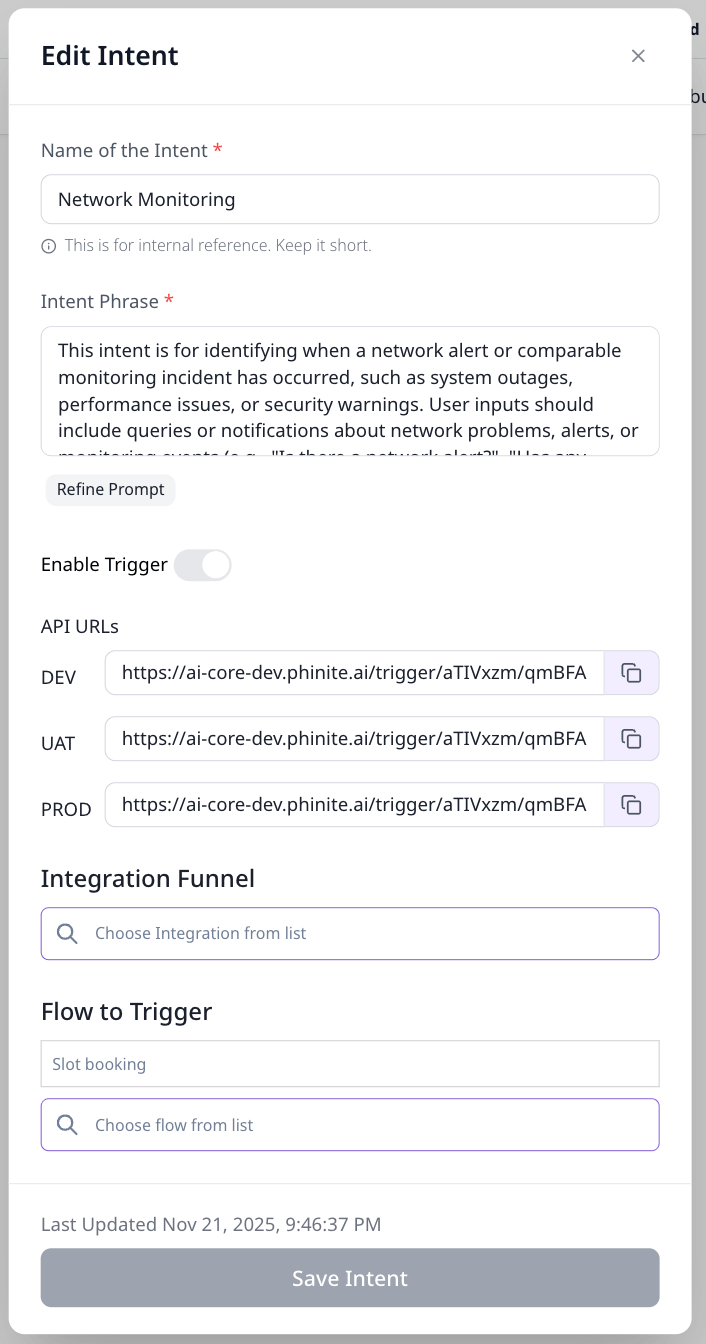
The **Edit Intent** screen allows you to expose an intent as an **API trigger**. When enabled, this intent can be invoked externally via an HTTP API call. Triggering this API will start the configured flow in the selected integration channel (for example, Microsoft Teams, Slack, etc.).
This is useful when you want external systems (monitoring tools, backend services, etc.) to programmatically initiate a conversation or workflow inside a supported integration.
 ## Enabling an Intent as an API
To enable an intent as an API:
1. Open the **Edit Intent** modal.
2. Toggle **Enable Trigger** to ON.
3. Select an **Integration** from the **Integration Funnel**.
4. Choose a **Agent Graph to Trigger** for that integration.
5. Save the intent.
6. Update the build with new intent version.
Once enabled, the platform generates **API URLs** for different environments:
* DEV
* UAT
* PROD
These endpoints can be called to trigger the intent.
## How It Works
When the generated API endpoint is called:
1. The request is authenticated using a **Bearer Token** (API key configured at the workspace level).
2. The intent is matched and executed.
3. The selected **flow** is triggered.
4. The conversation starts in the **chosen integration channel**.
### Example
If:
* The **Integration Funnel** is set to **Microsoft Teams**
* The selected flow is linked to a Teams bot/channel
Then:
* Calling the API will initiate a conversation in the configured Teams channel or bot.
## Authentication
All API requests must include a valid **Bearer Token** in the `Authorization` header.
```bash theme={null}
Authorization: Bearer
```
Requests without a valid token will be rejected.
## API Request Format
### Endpoint
Use the environment-specific API URL generated in the **Edit Intent** screen:
```text theme={null}
POST /trigger/{workspace_id}/{intent_id}/{environment}
```
(Exact URL varies by environment: DEV / UAT / PROD)
### Request Payload
The API accepts the following JSON payload:
```json theme={null}
{
"message": "",
"user_variables": {"key1":"value1", "key2":"value2"}
}
```
#### Field Descriptions
| Field | Type | Description |
| :--------------- | :----- | :------------------------------------------------------------------------------------------------------------ |
| `message` | String | The first message sent to the flow when the session starts. This can be empty if not required. |
| `user_variables` | Object | Session variables to initialize the conversation with. These variables will be available throughout the flow. |
### Special Case: Twilio Integration
When using **Twilio** as the integration channel, an additional parameter is required to initiate outbound calls:
#### Additional Field for Twilio
| Key | Value |
| :---------------- | :------------------------------------------------------------------ |
| `to_phone_number` | The destination phone number in E.164 format (e.g., `+19999999999`) |
## Session Initialization
* The `message` field is treated as the **first user message** in the conversation.
* The `user_variables` are injected at **session start**.
* Any variables passed here will be accessible inside the flow logic, conditions, and tools.
### Example Payload
```json theme={null}
{
"message": "Network alert detected for server-01",
"user_variables": {
"severity": "critical",
"source": "monitoring_service",
"server": "server-01"
}
}
```
This ensures the session starts with all required context already available.
## API Usage Examples
All examples below demonstrate how to trigger an intent API using a **API KEY** and a JSON payload.
### Request Details
* **Method:** `POST`
* **Authorization:** Bearer Token (workspace-level)
* **Content-Type:** `application/json`
### Sample Payload
Replace:
* `API_URL` with your DEV / UAT / PROD endpoint
* `YOUR_BEARER_TOKEN` with your workspace token
```bash cURL theme={null}
curl -X POST "https://app.phinite.ai/api/v1/ai/trigger/{workspace_id}/{trigger_id}/{environment}" \
-H "Authorization: Bearer workspace_api_key" \
-H "Content-Type: application/json" \
-d '{
"message": "start the task",
"user_variables": {
"key1": "value1",
"key2": "value2"
}
}'
```
```python Python theme={null}
import requests
import json
url = "https://app.phinite.ai/api/v1/ai/trigger/{workspace_id}/{trigger_id}/{environment}"
payload = json.dumps({
"message": "start the task",
"user_variables": {
"key1": "value1",
"key2": "value2"
}
})
headers = {
'Authorization': 'Bearer workspace_api_key',
'Content-Type': 'application/json'
}
response = requests.request("POST", url, headers=headers, data=payload)
print(response.text)
```
```javascript JavaScript theme={null}
const axios = require('axios');
let data = JSON.stringify({
"message": "start the task",
"user_variables": {
"key1": "value1",
"key2": "value2"
}
});
let config = {
method: 'post',
maxBodyLength: Infinity,
url: 'https://app.phinite.ai/api/v1/ai/trigger/{workspace_id}/{trigger_id}/{environment}',
headers: {
'Authorization': 'Bearer workspace_api_key',
'Content-Type': 'application/json'
},
data : data
};
axios.request(config)
.then((response) => {
console.log(JSON.stringify(response.data));
})
.catch((error) => {
console.log(error);
});
```
```java Java theme={null}
OkHttpClient client = new OkHttpClient().newBuilder()
.build();
MediaType mediaType = MediaType.parse("application/json");
RequestBody body = RequestBody.create(mediaType, "{\n \"message\": \"start the task\",\n \"user_variables\": {\n \"key1\": \"value1\",\n \"key2\": \"value2\"\n }\n }");
Request request = new Request.Builder()
.url("https://app.phinite.ai/api/v1/ai/trigger/{workspace_id}/{trigger_id}/{environment}")
.method("POST", body)
.addHeader("Authorization", "Bearer workspace_api_key")
.addHeader("Content-Type", "application/json")
.build();
Response response = client.newCall(request).execute();
```
```php PHP theme={null}
"Network alert detected for server-01",
"user_variables" => [
"severity" => "critical",
"source" => "monitoring_service",
"server" => "server-01"
]
];
curl_setopt_array($curl, [
CURLOPT_RETURNTRANSFER => true,
CURLOPT_POST => true,
CURLOPT_HTTPHEADER => [
"Authorization: Bearer YOUR_BEARER_TOKEN",
"Content-Type: application/json"
],
CURLOPT_POSTFIELDS => json_encode($data)
]);
$response = curl_exec($curl);
curl_close($curl);
echo $response;
```
```go Go theme={null}
package main
import (
"fmt"
"strings"
"net/http"
"io"
)
func main() {
url := "https://app.phinite.ai/api/v1/ai/trigger/{workspace_id}/{trigger_id}/{environment}"
method := "POST"
payload := strings.NewReader(`{
"message": "start the task",
"user_variables": {
"key1": "value1",
"key2": "value2"
}
}`)
client := &http.Client {
}
req, err := http.NewRequest(method, url, payload)
if err != nil {
fmt.Println(err)
return
}
req.Header.Add("Authorization", "Bearer workspace_api_key")
req.Header.Add("Content-Type", "application/json")
res, err := client.Do(req)
if err != nil {
fmt.Println(err)
return
}
defer res.Body.Close()
body, err := io.ReadAll(res.Body)
if err != nil {
fmt.Println(err)
return
}
fmt.Println(string(body))
}
```
```ruby Ruby theme={null}
require "uri"
require "json"
require "net/http"
url = URI("https://app.phinite.ai/api/v1/ai/trigger/{workspace_id}/{trigger_id}/{environment}")
https = Net::HTTP.new(url.host, url.port)
https.use_ssl = true
request = Net::HTTP::Post.new(url)
request["Authorization"] = "Bearer workspace_api_key"
request["Content-Type"] = "application/json"
request.body = JSON.dump({
"message": "start the task",
"user_variables": {
"key1": "value1",
"key2": "value2"
}
})
response = https.request(request)
puts response.read_body
```
### Twilio-Specific Example
```bash cURL (Twilio) theme={null}
curl --location --globoff 'https://app.phinite.ai/api/v1/ai/trigger/{workspace_id}/{trigger_id}/{environment}?to_phone_number=+19999999999' \
--header 'Content-Type: application/json' \
--header 'Authorization: Bearer workspace_api_key' \
--data '{"message":"start the task","user_variables": {"key1":"value1","key2":"value2"}}'
```
```python Python (Twilio) theme={null}
import requests
import json
url = "https://app.phinite.ai/api/v1/ai/trigger/{workspace_id}/{trigger_id}/{environment}?to_phone_number=+19999999999"
payload = json.dumps({
"message": "start the task",
"user_variables": {
"key1": "value1",
"key2": "value2"
}
})
headers = {
'Content-Type': 'application/json',
'Authorization': 'Bearer workspace_api_key'
}
response = requests.request("POST", url, headers=headers, data=payload)
print(response.text)
```
```javascript JavaScript (Twilio) theme={null}
const axios = require('axios');
let data = JSON.stringify({
"message": "start the task",
"user_variables": {
"key1": "value1",
"key2": "value2"
}
});
let config = {
method: 'post',
maxBodyLength: Infinity,
url: 'https://app.phinite.ai/api/v1/ai/trigger/{workspace_id}/{trigger_id}/{environment}?to_phone_number=+19999999999',
headers: {
'Content-Type': 'application/json',
'Authorization': 'Bearer workspace_api_key'
},
data : data
};
axios.request(config)
.then((response) => {
console.log(JSON.stringify(response.data));
})
.catch((error) => {
console.log(error);
});
```
```go Go (Twilio) theme={null}
package main
import (
"fmt"
"strings"
"net/http"
"io"
)
func main() {
url := "https://app.phinite.ai/api/v1/ai/trigger/{workspace_id}/{trigger_id}/{environment}?to_phone_number=+19999999999"
method := "POST"
payload := strings.NewReader(`{"message":"start the task","user_variables": {"key1":"value1","key2":"value2"}}`)
client := &http.Client {
}
req, err := http.NewRequest(method, url, payload)
if err != nil {
fmt.Println(err)
return
}
req.Header.Add("Content-Type", "application/json")
req.Header.Add("Authorization", "Bearer workspace_api_key")
res, err := client.Do(req)
if err != nil {
fmt.Println(err)
return
}
defer res.Body.Close()
body, err := io.ReadAll(res.Body)
if err != nil {
fmt.Println(err)
return
}
fmt.Println(string(body))
}
```
```php PHP (Twilio) theme={null}
'https://app.phinite.ai/api/v1/ai/trigger/{workspace_id}/{trigger_id}/{environment}?to_phone_number=+19999999999',
CURLOPT_RETURNTRANSFER => true,
CURLOPT_ENCODING => '',
CURLOPT_MAXREDIRS => 10,
CURLOPT_TIMEOUT => 0,
CURLOPT_FOLLOWLOCATION => true,
CURLOPT_HTTP_VERSION => CURL_HTTP_VERSION_1_1,
CURLOPT_CUSTOMREQUEST => 'POST',
CURLOPT_POSTFIELDS =>'{"message":"start the task","user_variables": {"key1":"value1","key2":"value2"}}',
CURLOPT_HTTPHEADER => array(
'Content-Type: application/json',
'Authorization: Bearer workspace_api_key'
),
));
$response = curl_exec($curl);
curl_close($curl);
echo $response;
```
```ruby Ruby theme={null}
require "uri"
require "json"
require "net/http"
url = URI("https://app.phinite.ai/api/v1/ai/trigger/{workspace_id}/{trigger_id}/{environment}?to_phone_number=+19999999999")
https = Net::HTTP.new(url.host, url.port)
https.use_ssl = true
request = Net::HTTP::Post.new(url)
request["Content-Type"] = "application/json"
request["Authorization"] = "Bearer workspace_api_key"
request.body = JSON.dump({
"message": "start the task",
"user_variables": {
"key1": "value1",
"key2": "value2"
}
})
response = https.request(request)
puts response.read_body
```
***
## Response Examples
### Success Response (200 OK)
```json theme={null}
{
"workflow_id": "uuid-12345",
"response": {
"flow_transfer": "Agent Graph shift from Trigger to {channel} Conversational"
},
"status": "waiting_for_input",
"requires_input": true,
"error": null
}
```
### Twilio Success Response (200 OK)
When triggering a Twilio outbound call, the response includes call-specific details:
```json theme={null}
{
"status": "call_initiated",
"call_sid": "sid-uuid-12345",
"to_number": "to_phone_number",
"from_number": "from_your_twilio_integration",
"call_status": "queued",
"tracking_id": "tracking-uuid-12345",
"flow_id": "flow-uuid-12345",
"environment": "env",
"integration_id": "integration-uuid-12345",
"user_variables": {"key1":"value1","key2":"value2"},
"message": "Outbound call initiated successfully. The flow will start when the call is answered.",
"response": {
"type": "outbound_call",
"details": "Call initiated and will connect to flow upon answer"
}
}
```
### Error Responses
```json 401 Unauthorized theme={null}
{
"detail": "Invalid authentication credentials"
}
```
```json 422 Unprocessable Entity theme={null}
{
"detail": [
{
"type": "dict_type",
"loc": [
"body",
"user_variables"
],
"msg": "Input should be a valid dictionary",
"input": "string"
}
]
}
```
```json 500 Server Error theme={null}
{
"detail": "Process query failed: 'Request' object has no attribute 'get'"
}
```
## Common Use Cases
* Triggering incident workflows from monitoring systems
* Starting conversations from backend services
* Initiating alerts in Teams or other channels
* Passing structured context into a flow at runtime
* **Twilio:** Initiating outbound calls for notifications, reminders, or follow-ups
## Notes & Best Practices
* Ensure the **integration channel** is properly configured and connected.
* Always validate the Bearer Token before deploying to PROD.
* Use `user_variables` for structured data instead of embedding everything in the message.
* Keep the intent name short and descriptive for internal reference.
* Test thoroughly in DEV environment before promoting to UAT/PROD.
* **For Twilio:** Always provide phone numbers in E.164 format (e.g., `+1234567890`) to ensure proper call routing.
## Enabling an Intent as an API
To enable an intent as an API:
1. Open the **Edit Intent** modal.
2. Toggle **Enable Trigger** to ON.
3. Select an **Integration** from the **Integration Funnel**.
4. Choose a **Agent Graph to Trigger** for that integration.
5. Save the intent.
6. Update the build with new intent version.
Once enabled, the platform generates **API URLs** for different environments:
* DEV
* UAT
* PROD
These endpoints can be called to trigger the intent.
## How It Works
When the generated API endpoint is called:
1. The request is authenticated using a **Bearer Token** (API key configured at the workspace level).
2. The intent is matched and executed.
3. The selected **flow** is triggered.
4. The conversation starts in the **chosen integration channel**.
### Example
If:
* The **Integration Funnel** is set to **Microsoft Teams**
* The selected flow is linked to a Teams bot/channel
Then:
* Calling the API will initiate a conversation in the configured Teams channel or bot.
## Authentication
All API requests must include a valid **Bearer Token** in the `Authorization` header.
```bash theme={null}
Authorization: Bearer
```
Requests without a valid token will be rejected.
## API Request Format
### Endpoint
Use the environment-specific API URL generated in the **Edit Intent** screen:
```text theme={null}
POST /trigger/{workspace_id}/{intent_id}/{environment}
```
(Exact URL varies by environment: DEV / UAT / PROD)
### Request Payload
The API accepts the following JSON payload:
```json theme={null}
{
"message": "",
"user_variables": {"key1":"value1", "key2":"value2"}
}
```
#### Field Descriptions
| Field | Type | Description |
| :--------------- | :----- | :------------------------------------------------------------------------------------------------------------ |
| `message` | String | The first message sent to the flow when the session starts. This can be empty if not required. |
| `user_variables` | Object | Session variables to initialize the conversation with. These variables will be available throughout the flow. |
### Special Case: Twilio Integration
When using **Twilio** as the integration channel, an additional parameter is required to initiate outbound calls:
#### Additional Field for Twilio
| Key | Value |
| :---------------- | :------------------------------------------------------------------ |
| `to_phone_number` | The destination phone number in E.164 format (e.g., `+19999999999`) |
## Session Initialization
* The `message` field is treated as the **first user message** in the conversation.
* The `user_variables` are injected at **session start**.
* Any variables passed here will be accessible inside the flow logic, conditions, and tools.
### Example Payload
```json theme={null}
{
"message": "Network alert detected for server-01",
"user_variables": {
"severity": "critical",
"source": "monitoring_service",
"server": "server-01"
}
}
```
This ensures the session starts with all required context already available.
## API Usage Examples
All examples below demonstrate how to trigger an intent API using a **API KEY** and a JSON payload.
### Request Details
* **Method:** `POST`
* **Authorization:** Bearer Token (workspace-level)
* **Content-Type:** `application/json`
### Sample Payload
Replace:
* `API_URL` with your DEV / UAT / PROD endpoint
* `YOUR_BEARER_TOKEN` with your workspace token
```bash cURL theme={null}
curl -X POST "https://app.phinite.ai/api/v1/ai/trigger/{workspace_id}/{trigger_id}/{environment}" \
-H "Authorization: Bearer workspace_api_key" \
-H "Content-Type: application/json" \
-d '{
"message": "start the task",
"user_variables": {
"key1": "value1",
"key2": "value2"
}
}'
```
```python Python theme={null}
import requests
import json
url = "https://app.phinite.ai/api/v1/ai/trigger/{workspace_id}/{trigger_id}/{environment}"
payload = json.dumps({
"message": "start the task",
"user_variables": {
"key1": "value1",
"key2": "value2"
}
})
headers = {
'Authorization': 'Bearer workspace_api_key',
'Content-Type': 'application/json'
}
response = requests.request("POST", url, headers=headers, data=payload)
print(response.text)
```
```javascript JavaScript theme={null}
const axios = require('axios');
let data = JSON.stringify({
"message": "start the task",
"user_variables": {
"key1": "value1",
"key2": "value2"
}
});
let config = {
method: 'post',
maxBodyLength: Infinity,
url: 'https://app.phinite.ai/api/v1/ai/trigger/{workspace_id}/{trigger_id}/{environment}',
headers: {
'Authorization': 'Bearer workspace_api_key',
'Content-Type': 'application/json'
},
data : data
};
axios.request(config)
.then((response) => {
console.log(JSON.stringify(response.data));
})
.catch((error) => {
console.log(error);
});
```
```java Java theme={null}
OkHttpClient client = new OkHttpClient().newBuilder()
.build();
MediaType mediaType = MediaType.parse("application/json");
RequestBody body = RequestBody.create(mediaType, "{\n \"message\": \"start the task\",\n \"user_variables\": {\n \"key1\": \"value1\",\n \"key2\": \"value2\"\n }\n }");
Request request = new Request.Builder()
.url("https://app.phinite.ai/api/v1/ai/trigger/{workspace_id}/{trigger_id}/{environment}")
.method("POST", body)
.addHeader("Authorization", "Bearer workspace_api_key")
.addHeader("Content-Type", "application/json")
.build();
Response response = client.newCall(request).execute();
```
```php PHP theme={null}
"Network alert detected for server-01",
"user_variables" => [
"severity" => "critical",
"source" => "monitoring_service",
"server" => "server-01"
]
];
curl_setopt_array($curl, [
CURLOPT_RETURNTRANSFER => true,
CURLOPT_POST => true,
CURLOPT_HTTPHEADER => [
"Authorization: Bearer YOUR_BEARER_TOKEN",
"Content-Type: application/json"
],
CURLOPT_POSTFIELDS => json_encode($data)
]);
$response = curl_exec($curl);
curl_close($curl);
echo $response;
```
```go Go theme={null}
package main
import (
"fmt"
"strings"
"net/http"
"io"
)
func main() {
url := "https://app.phinite.ai/api/v1/ai/trigger/{workspace_id}/{trigger_id}/{environment}"
method := "POST"
payload := strings.NewReader(`{
"message": "start the task",
"user_variables": {
"key1": "value1",
"key2": "value2"
}
}`)
client := &http.Client {
}
req, err := http.NewRequest(method, url, payload)
if err != nil {
fmt.Println(err)
return
}
req.Header.Add("Authorization", "Bearer workspace_api_key")
req.Header.Add("Content-Type", "application/json")
res, err := client.Do(req)
if err != nil {
fmt.Println(err)
return
}
defer res.Body.Close()
body, err := io.ReadAll(res.Body)
if err != nil {
fmt.Println(err)
return
}
fmt.Println(string(body))
}
```
```ruby Ruby theme={null}
require "uri"
require "json"
require "net/http"
url = URI("https://app.phinite.ai/api/v1/ai/trigger/{workspace_id}/{trigger_id}/{environment}")
https = Net::HTTP.new(url.host, url.port)
https.use_ssl = true
request = Net::HTTP::Post.new(url)
request["Authorization"] = "Bearer workspace_api_key"
request["Content-Type"] = "application/json"
request.body = JSON.dump({
"message": "start the task",
"user_variables": {
"key1": "value1",
"key2": "value2"
}
})
response = https.request(request)
puts response.read_body
```
### Twilio-Specific Example
```bash cURL (Twilio) theme={null}
curl --location --globoff 'https://app.phinite.ai/api/v1/ai/trigger/{workspace_id}/{trigger_id}/{environment}?to_phone_number=+19999999999' \
--header 'Content-Type: application/json' \
--header 'Authorization: Bearer workspace_api_key' \
--data '{"message":"start the task","user_variables": {"key1":"value1","key2":"value2"}}'
```
```python Python (Twilio) theme={null}
import requests
import json
url = "https://app.phinite.ai/api/v1/ai/trigger/{workspace_id}/{trigger_id}/{environment}?to_phone_number=+19999999999"
payload = json.dumps({
"message": "start the task",
"user_variables": {
"key1": "value1",
"key2": "value2"
}
})
headers = {
'Content-Type': 'application/json',
'Authorization': 'Bearer workspace_api_key'
}
response = requests.request("POST", url, headers=headers, data=payload)
print(response.text)
```
```javascript JavaScript (Twilio) theme={null}
const axios = require('axios');
let data = JSON.stringify({
"message": "start the task",
"user_variables": {
"key1": "value1",
"key2": "value2"
}
});
let config = {
method: 'post',
maxBodyLength: Infinity,
url: 'https://app.phinite.ai/api/v1/ai/trigger/{workspace_id}/{trigger_id}/{environment}?to_phone_number=+19999999999',
headers: {
'Content-Type': 'application/json',
'Authorization': 'Bearer workspace_api_key'
},
data : data
};
axios.request(config)
.then((response) => {
console.log(JSON.stringify(response.data));
})
.catch((error) => {
console.log(error);
});
```
```go Go (Twilio) theme={null}
package main
import (
"fmt"
"strings"
"net/http"
"io"
)
func main() {
url := "https://app.phinite.ai/api/v1/ai/trigger/{workspace_id}/{trigger_id}/{environment}?to_phone_number=+19999999999"
method := "POST"
payload := strings.NewReader(`{"message":"start the task","user_variables": {"key1":"value1","key2":"value2"}}`)
client := &http.Client {
}
req, err := http.NewRequest(method, url, payload)
if err != nil {
fmt.Println(err)
return
}
req.Header.Add("Content-Type", "application/json")
req.Header.Add("Authorization", "Bearer workspace_api_key")
res, err := client.Do(req)
if err != nil {
fmt.Println(err)
return
}
defer res.Body.Close()
body, err := io.ReadAll(res.Body)
if err != nil {
fmt.Println(err)
return
}
fmt.Println(string(body))
}
```
```php PHP (Twilio) theme={null}
'https://app.phinite.ai/api/v1/ai/trigger/{workspace_id}/{trigger_id}/{environment}?to_phone_number=+19999999999',
CURLOPT_RETURNTRANSFER => true,
CURLOPT_ENCODING => '',
CURLOPT_MAXREDIRS => 10,
CURLOPT_TIMEOUT => 0,
CURLOPT_FOLLOWLOCATION => true,
CURLOPT_HTTP_VERSION => CURL_HTTP_VERSION_1_1,
CURLOPT_CUSTOMREQUEST => 'POST',
CURLOPT_POSTFIELDS =>'{"message":"start the task","user_variables": {"key1":"value1","key2":"value2"}}',
CURLOPT_HTTPHEADER => array(
'Content-Type: application/json',
'Authorization: Bearer workspace_api_key'
),
));
$response = curl_exec($curl);
curl_close($curl);
echo $response;
```
```ruby Ruby theme={null}
require "uri"
require "json"
require "net/http"
url = URI("https://app.phinite.ai/api/v1/ai/trigger/{workspace_id}/{trigger_id}/{environment}?to_phone_number=+19999999999")
https = Net::HTTP.new(url.host, url.port)
https.use_ssl = true
request = Net::HTTP::Post.new(url)
request["Content-Type"] = "application/json"
request["Authorization"] = "Bearer workspace_api_key"
request.body = JSON.dump({
"message": "start the task",
"user_variables": {
"key1": "value1",
"key2": "value2"
}
})
response = https.request(request)
puts response.read_body
```
***
## Response Examples
### Success Response (200 OK)
```json theme={null}
{
"workflow_id": "uuid-12345",
"response": {
"flow_transfer": "Agent Graph shift from Trigger to {channel} Conversational"
},
"status": "waiting_for_input",
"requires_input": true,
"error": null
}
```
### Twilio Success Response (200 OK)
When triggering a Twilio outbound call, the response includes call-specific details:
```json theme={null}
{
"status": "call_initiated",
"call_sid": "sid-uuid-12345",
"to_number": "to_phone_number",
"from_number": "from_your_twilio_integration",
"call_status": "queued",
"tracking_id": "tracking-uuid-12345",
"flow_id": "flow-uuid-12345",
"environment": "env",
"integration_id": "integration-uuid-12345",
"user_variables": {"key1":"value1","key2":"value2"},
"message": "Outbound call initiated successfully. The flow will start when the call is answered.",
"response": {
"type": "outbound_call",
"details": "Call initiated and will connect to flow upon answer"
}
}
```
### Error Responses
```json 401 Unauthorized theme={null}
{
"detail": "Invalid authentication credentials"
}
```
```json 422 Unprocessable Entity theme={null}
{
"detail": [
{
"type": "dict_type",
"loc": [
"body",
"user_variables"
],
"msg": "Input should be a valid dictionary",
"input": "string"
}
]
}
```
```json 500 Server Error theme={null}
{
"detail": "Process query failed: 'Request' object has no attribute 'get'"
}
```
## Common Use Cases
* Triggering incident workflows from monitoring systems
* Starting conversations from backend services
* Initiating alerts in Teams or other channels
* Passing structured context into a flow at runtime
* **Twilio:** Initiating outbound calls for notifications, reminders, or follow-ups
## Notes & Best Practices
* Ensure the **integration channel** is properly configured and connected.
* Always validate the Bearer Token before deploying to PROD.
* Use `user_variables` for structured data instead of embedding everything in the message.
* Keep the intent name short and descriptive for internal reference.
* Test thoroughly in DEV environment before promoting to UAT/PROD.
* **For Twilio:** Always provide phone numbers in E.164 format (e.g., `+1234567890`) to ensure proper call routing.