> ## Documentation Index
> Fetch the complete documentation index at: https://docs.phinite.ai/llms.txt
> Use this file to discover all available pages before exploring further.
# RAG connectors
> Add files, websites, wikis, and synced folders to a RAG collection.
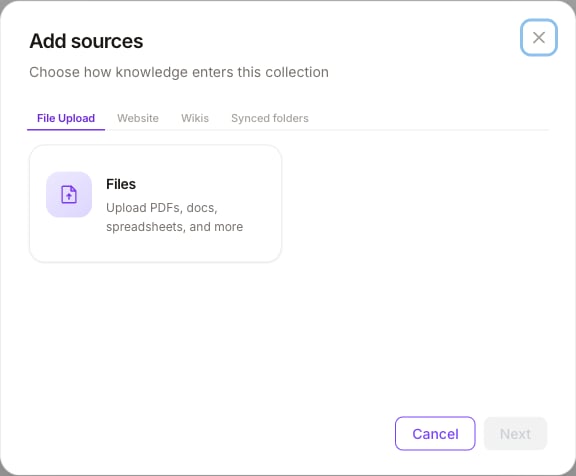
Use **Add sources** on a collection detail page to choose how knowledge enters that collection. Connectors are grouped into four tabs in the wizard.
 ## Connector groups
| Tab | Connectors | Typical use |
| ------------------ | -------------------------------- | -------------------------------------------------- |
| **File Upload** | **Files** | Upload PDFs, docs, spreadsheets, and similar files |
| **Website** | **URLs** | Crawl or ingest web pages into the collection |
| **Wikis** | **Notion**, **Confluence** | Pull pages from connected wiki workspaces |
| **Synced folders** | **Google Drive**, **SharePoint** | Watch folders and keep files in sync |
Exact connector availability follows your workspace integrations and account links. Complete OAuth or credentials when the wizard asks before selecting folders or pages.
## Add sources
1. Open **BUILD → RAG Collections** and select a collection.
2. Click **Add sources**.
3. Pick a tab (**File Upload**, **Website**, **Wikis**, or **Synced folders**).
4. Choose the connector card (for example **Files**).
5. Complete upload, URL, or account/folder selection.
6. Confirm — sources appear on the collection and begin indexing.
**Add sources** is admin-gated: workspace Admin (or Superadmin) roles can manage sources. Users with read-only datasource permissions can open collections but cannot add or sync connectors.
## After ingest
* Check file counts and status on the collection list and detail page.
* Adjust **chunk size** / **chunk overlap** if retrieval quality needs tuning (see [RAG overview](/rag/overview)).
* Attach the collection to agent nodes in Graph Studio ([Attach to nodes](/rag/attach-to-nodes)).
## Related
Collections, chunking, and where RAG lives in the product.
Ground agent answers in attached collections.
## Connector groups
| Tab | Connectors | Typical use |
| ------------------ | -------------------------------- | -------------------------------------------------- |
| **File Upload** | **Files** | Upload PDFs, docs, spreadsheets, and similar files |
| **Website** | **URLs** | Crawl or ingest web pages into the collection |
| **Wikis** | **Notion**, **Confluence** | Pull pages from connected wiki workspaces |
| **Synced folders** | **Google Drive**, **SharePoint** | Watch folders and keep files in sync |
Exact connector availability follows your workspace integrations and account links. Complete OAuth or credentials when the wizard asks before selecting folders or pages.
## Add sources
1. Open **BUILD → RAG Collections** and select a collection.
2. Click **Add sources**.
3. Pick a tab (**File Upload**, **Website**, **Wikis**, or **Synced folders**).
4. Choose the connector card (for example **Files**).
5. Complete upload, URL, or account/folder selection.
6. Confirm — sources appear on the collection and begin indexing.
**Add sources** is admin-gated: workspace Admin (or Superadmin) roles can manage sources. Users with read-only datasource permissions can open collections but cannot add or sync connectors.
## After ingest
* Check file counts and status on the collection list and detail page.
* Adjust **chunk size** / **chunk overlap** if retrieval quality needs tuning (see [RAG overview](/rag/overview)).
* Attach the collection to agent nodes in Graph Studio ([Attach to nodes](/rag/attach-to-nodes)).
## Related
Collections, chunking, and where RAG lives in the product.
Ground agent answers in attached collections.