> ## Documentation Index
> Fetch the complete documentation index at: https://docs.phinite.ai/llms.txt
> Use this file to discover all available pages before exploring further.
# Attach guardrails
> Bind guardrail profiles to an entire flow or one agent in Studio LLM Governance.
Attach profiles so builds enforce LLM safety on the selected scope.
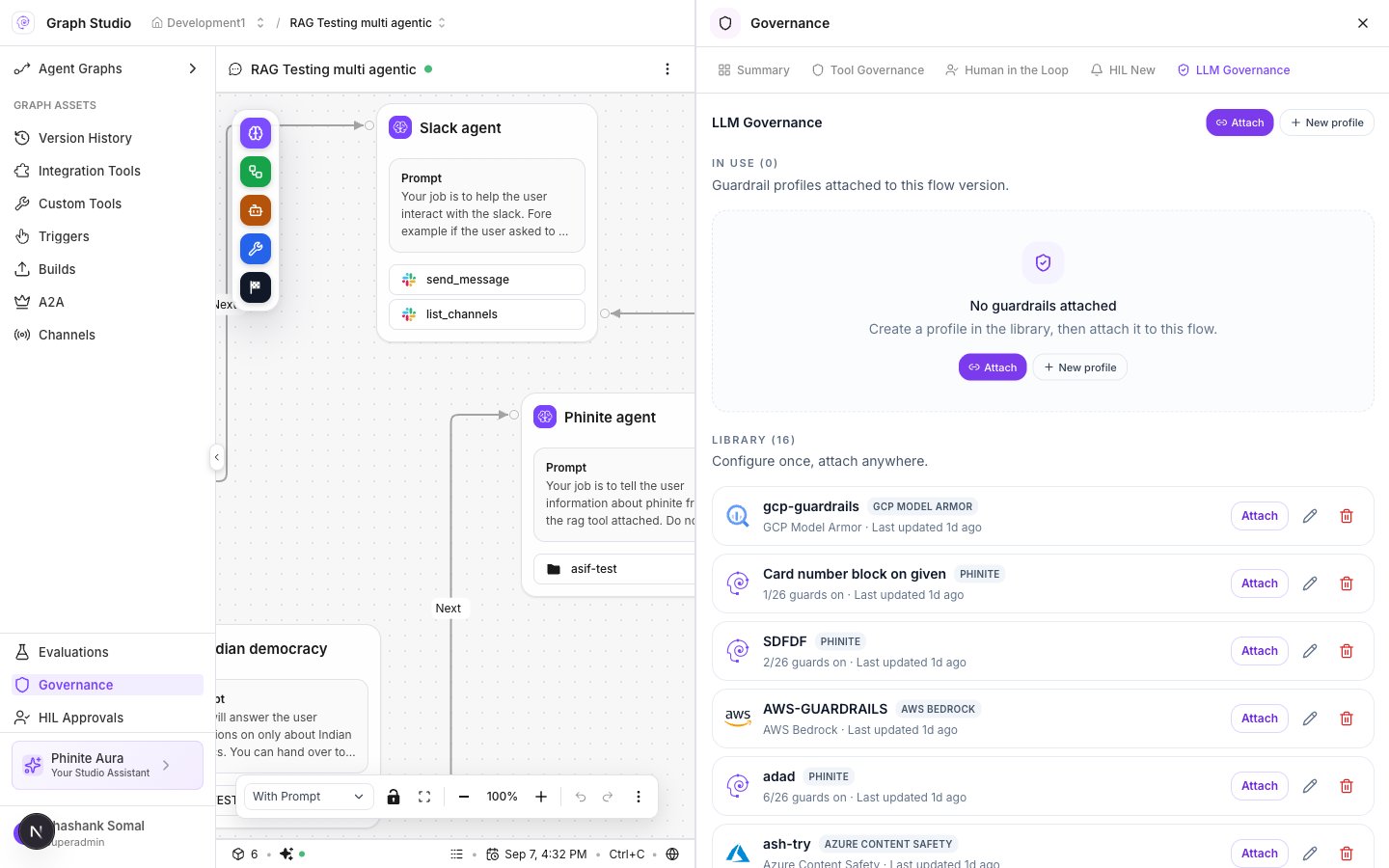 ## Attach wizard
1. Open Graph Studio → **Governance** → **LLM Governance**.
2. Click **Attach** (header or on a library row).
3. Modal title: **Attach guardrails**.
4. **Apply to**: **Entire flow** or **One agent** (pick the agent node when scoped).
5. Select one or more **Guardrail profiles**.
6. Confirm **Attach guardrails**.
Binding payload (conceptually): `binding_type: "guardrail"`, `guardrail_profile_id`, `flow_version`, optional `agent_node_id`, `workspaceId` / `flowid`.
## In Use
Attached profiles appear under **In Use (N)** for this flow version. Detach or edit from the row actions. Summary’s **LLM Governance** card shows whether anything is attached.
## From Summary
On **Governance → Summary**, open the **LLM Governance** card → **Open** to jump to the module, then attach.
## Related
* [Create profiles](/guardrails/profiles)
* [Guardrails overview](/guardrails/overview)
* [Tool policies](/governance/tool-policies) (separate binding type: `policy`)
## Attach wizard
1. Open Graph Studio → **Governance** → **LLM Governance**.
2. Click **Attach** (header or on a library row).
3. Modal title: **Attach guardrails**.
4. **Apply to**: **Entire flow** or **One agent** (pick the agent node when scoped).
5. Select one or more **Guardrail profiles**.
6. Confirm **Attach guardrails**.
Binding payload (conceptually): `binding_type: "guardrail"`, `guardrail_profile_id`, `flow_version`, optional `agent_node_id`, `workspaceId` / `flowid`.
## In Use
Attached profiles appear under **In Use (N)** for this flow version. Detach or edit from the row actions. Summary’s **LLM Governance** card shows whether anything is attached.
## From Summary
On **Governance → Summary**, open the **LLM Governance** card → **Open** to jump to the module, then attach.
## Related
* [Create profiles](/guardrails/profiles)
* [Guardrails overview](/guardrails/overview)
* [Tool policies](/governance/tool-policies) (separate binding type: `policy`)