> ## Documentation Index
> Fetch the complete documentation index at: https://docs.phinite.ai/llms.txt
> Use this file to discover all available pages before exploring further.
# Types of Session Variables
Session variables in your flow can be categorized into several types based on how they are created and managed.
## Capture Variables
Capture Variables are automatically captured by the Agent during execution based on the description you provide. The Agent identifies and stores relevant information as the workflow progresses.
## Tool-Returned Capture Variables
These variables are returned by tools during execution, including both custom and predefined tools.
For custom tools, simply return the variables in the `capture_variables` dictionary, and they will be automatically stored as session variables(each key stored as seperate session variable).
## User Variables
User Variables are defined in the API payload before executing an autonomous or conversational flow. These allow you to pass initial data into your workflow.
## System Variables
The following system variables are automatically set in every session:
* **`workflow_id`** - A unique identifier assigned to each workflow execution
* **`caller_number`** - Available during voice calls, containing the caller's phone number
* `conversation_history` - Available throughout the particular workflow execution
## Predefined Tool Variables
When using predefined tools, the entire output object returned by the tool is saved as a session variable.
### Example: Telegram Tool
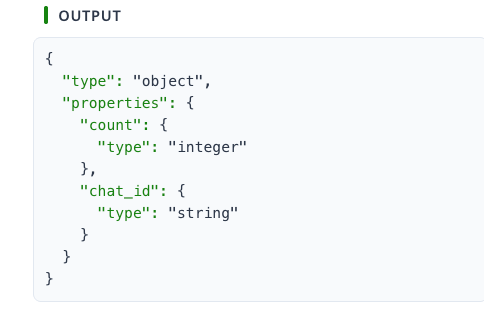 For the `telegram.get_chat_member_count` tool (from the Telegram integration), the complete output object is stored in the session and can be accessed using dot notation:
```python theme={null}
telegram.get_chat_member_count.count
telegram.get_chat_member_count.chat_id
```
### Using in Custom Tools
You can access these variables in your custom tools like this:
```python theme={null}
# Retrieve the entire output object
telegram_output = inputs.get('telegram.get_chat_member_count')
# Access specific fields
chat_id = telegram_output.get("chat_id")
member_count = telegram_output.get("count")
```
The session variable name follows the pattern: `{tool_name}.{subtool_name}`
For the `telegram.get_chat_member_count` tool (from the Telegram integration), the complete output object is stored in the session and can be accessed using dot notation:
```python theme={null}
telegram.get_chat_member_count.count
telegram.get_chat_member_count.chat_id
```
### Using in Custom Tools
You can access these variables in your custom tools like this:
```python theme={null}
# Retrieve the entire output object
telegram_output = inputs.get('telegram.get_chat_member_count')
# Access specific fields
chat_id = telegram_output.get("chat_id")
member_count = telegram_output.get("count")
```
The session variable name follows the pattern: `{tool_name}.{subtool_name}`