> ## Documentation Index
> Fetch the complete documentation index at: https://docs.phinite.ai/llms.txt
> Use this file to discover all available pages before exploring further.
# Input Variables in Agent Node
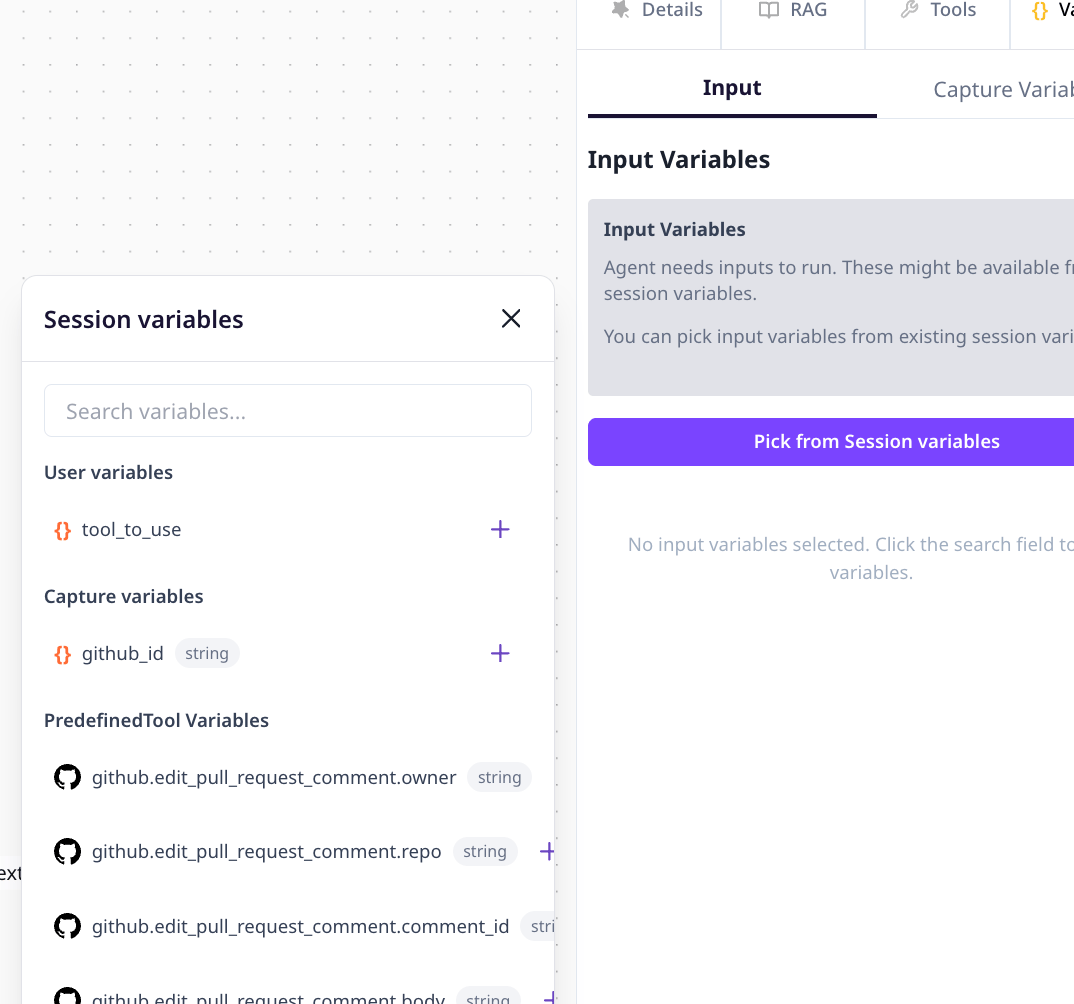 ## Overview
Input variables control which session variables are accessible to a specific agent node. By defining input variables, you restrict the agent's scope to only the variables it needs to complete its task.
## Supported Variable Sources
Input variables can be sourced from multiple locations:
Variables captured by tools during execution. Simply enter the exact variable name to include it.
Variables captured by other agent nodes in the same workflow.
Variables previously captured by the same agent node in earlier executions.
When using the Agent Graph API, you can reference variables from the `user_variable` keys in the API payload.
Only add the variables your agent actually needs. This improves performance and prevents the agent from being overwhelmed with unnecessary context.
## Overview
Input variables control which session variables are accessible to a specific agent node. By defining input variables, you restrict the agent's scope to only the variables it needs to complete its task.
## Supported Variable Sources
Input variables can be sourced from multiple locations:
Variables captured by tools during execution. Simply enter the exact variable name to include it.
Variables captured by other agent nodes in the same workflow.
Variables previously captured by the same agent node in earlier executions.
When using the Agent Graph API, you can reference variables from the `user_variable` keys in the API payload.
Only add the variables your agent actually needs. This improves performance and prevents the agent from being overwhelmed with unnecessary context.