> ## Documentation Index
> Fetch the complete documentation index at: https://docs.phinite.ai/llms.txt
> Use this file to discover all available pages before exploring further.
# Tool policies
> Create and attach Tool Governance policies — Details, Tools, Actions, Sandbox, Review.
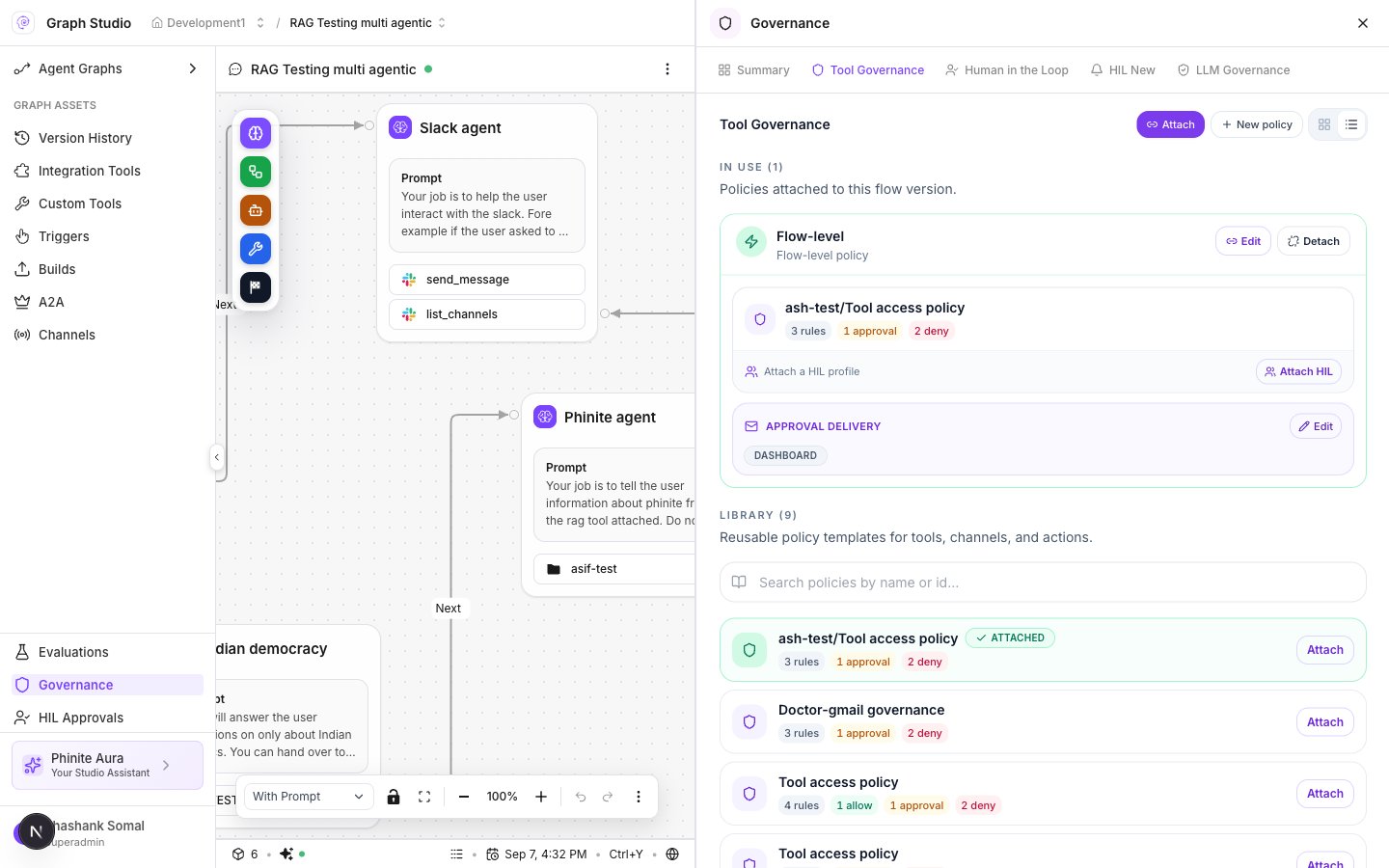
**Tool Governance** attaches reusable tool-access policies to a flow version. Each policy is a set of rules that **Allow**, require **Human approval**, or **Deny** tool calls.
 ## Rule effects
| UI label | Behavior |
| ------------------ | ----------------------------------------------------------------- |
| **Allow** | Tool call proceeds (optional argument rules) |
| **Human approval** | Tool call waits for a person ([Approvals](/governance/approvals)) |
| **Deny** | Tool call is blocked (default for unlisted actions) |
Policy cards summarize rule counts (for example `3 rules, 1 approval, 2 deny`).
## Create a policy (Studio wizard)
In Graph Studio → **Governance** → **Tool Governance** → create / **New policy**. Steps are dynamic:
| Step | Title | What you configure |
| ---- | ----------------------- | ----------------------------------------------------------------------------------------------------------------------------------------------------------------------------------------------------------------------------------------------------------------- |
| 1 | **Details** | **Name** (placeholder `Policy name`), **Description** (`Describe what this policy controls`) |
| 2 | **Tools** | Pick tools from the catalog: Integration Hub, MCP, or code runner |
| 3 | **Actions & arguments** | Shown for non–code-runner tools. Per action: **Allow** / **Human approval** / **Deny**. Argument constraints when Allow or HITL. All actions default to deny unless you change them |
| 4 | **Sandbox config** | Shown if a code runner tool is selected. **Kill switch** / **Disable all code execution**, **Reason**, **Limits** (`Timeout (seconds)`, `Max output bytes`, `Max code size bytes`, `Max input size bytes`), **Env variable filtering** (`allowlist` / `denylist`) |
| 5 | **Review** | **Policy document**, optional **Test policy (simulate)** with env **Development** / **UAT** / **Production**, action, **channel id**, **Simulate** |
Navigation: **Continue** to the next step · **Back** · final save.
## Attach a policy
1. Open **Tool Governance**.
2. Under **Library**, choose a policy → **Attach** (or **Attach governance**).
3. **Apply to**: **Entire flow** or **One agent**.
4. If the policy has **Human approval** rules, complete **Approval delivery**:
* Channels: **Dashboard** and/or **Email**
* **Users** (email recipients) when Email is on
5. Confirm attach. Binding stores `binding_type: "policy"`, `policy_ids`, `flow_version`, optional `agent_node_id`, and `approval_notification`.
**In Use** lists policies on this flow version with **Edit**, **Detach**, **Attach HIL**, and **Approval delivery**.
## Library vs In Use
| Section | Copy |
| ----------- | ----------------------------------------------------- |
| **In Use** | Policies attached to this flow version |
| **Library** | Reusable workspace policies you can search and attach |
## Workspace Policies tab
**OPERATE → Governance → Policies** shows fleet metrics (blocked vs logged, approvals resolved, rule mix). Use it to spot hotspots, then fix bindings in Studio.
## Related
* [HITL](/governance/hitl)
* [Approvals](/governance/approvals)
* [Governance overview](/governance/overview)
* [Guardrails](/guardrails/overview)
## Rule effects
| UI label | Behavior |
| ------------------ | ----------------------------------------------------------------- |
| **Allow** | Tool call proceeds (optional argument rules) |
| **Human approval** | Tool call waits for a person ([Approvals](/governance/approvals)) |
| **Deny** | Tool call is blocked (default for unlisted actions) |
Policy cards summarize rule counts (for example `3 rules, 1 approval, 2 deny`).
## Create a policy (Studio wizard)
In Graph Studio → **Governance** → **Tool Governance** → create / **New policy**. Steps are dynamic:
| Step | Title | What you configure |
| ---- | ----------------------- | ----------------------------------------------------------------------------------------------------------------------------------------------------------------------------------------------------------------------------------------------------------------- |
| 1 | **Details** | **Name** (placeholder `Policy name`), **Description** (`Describe what this policy controls`) |
| 2 | **Tools** | Pick tools from the catalog: Integration Hub, MCP, or code runner |
| 3 | **Actions & arguments** | Shown for non–code-runner tools. Per action: **Allow** / **Human approval** / **Deny**. Argument constraints when Allow or HITL. All actions default to deny unless you change them |
| 4 | **Sandbox config** | Shown if a code runner tool is selected. **Kill switch** / **Disable all code execution**, **Reason**, **Limits** (`Timeout (seconds)`, `Max output bytes`, `Max code size bytes`, `Max input size bytes`), **Env variable filtering** (`allowlist` / `denylist`) |
| 5 | **Review** | **Policy document**, optional **Test policy (simulate)** with env **Development** / **UAT** / **Production**, action, **channel id**, **Simulate** |
Navigation: **Continue** to the next step · **Back** · final save.
## Attach a policy
1. Open **Tool Governance**.
2. Under **Library**, choose a policy → **Attach** (or **Attach governance**).
3. **Apply to**: **Entire flow** or **One agent**.
4. If the policy has **Human approval** rules, complete **Approval delivery**:
* Channels: **Dashboard** and/or **Email**
* **Users** (email recipients) when Email is on
5. Confirm attach. Binding stores `binding_type: "policy"`, `policy_ids`, `flow_version`, optional `agent_node_id`, and `approval_notification`.
**In Use** lists policies on this flow version with **Edit**, **Detach**, **Attach HIL**, and **Approval delivery**.
## Library vs In Use
| Section | Copy |
| ----------- | ----------------------------------------------------- |
| **In Use** | Policies attached to this flow version |
| **Library** | Reusable workspace policies you can search and attach |
## Workspace Policies tab
**OPERATE → Governance → Policies** shows fleet metrics (blocked vs logged, approvals resolved, rule mix). Use it to spot hotspots, then fix bindings in Studio.
## Related
* [HITL](/governance/hitl)
* [Approvals](/governance/approvals)
* [Governance overview](/governance/overview)
* [Guardrails](/guardrails/overview)