> ## Documentation Index
> Fetch the complete documentation index at: https://docs.phinite.ai/llms.txt
> Use this file to discover all available pages before exploring further.
# Predefined Tools
> Add and configure pre-packaged tools; reference for each tool and its subtools.
## Available integrations
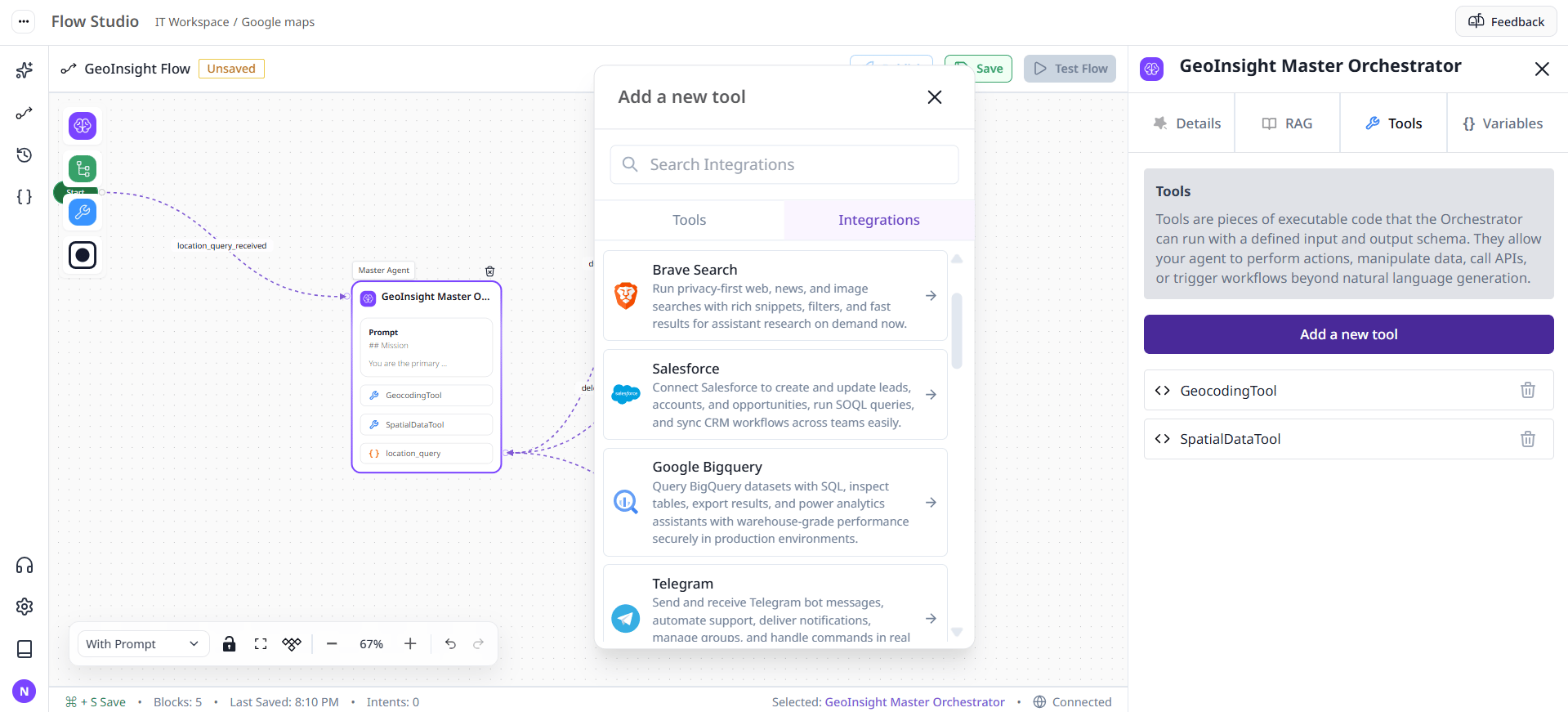
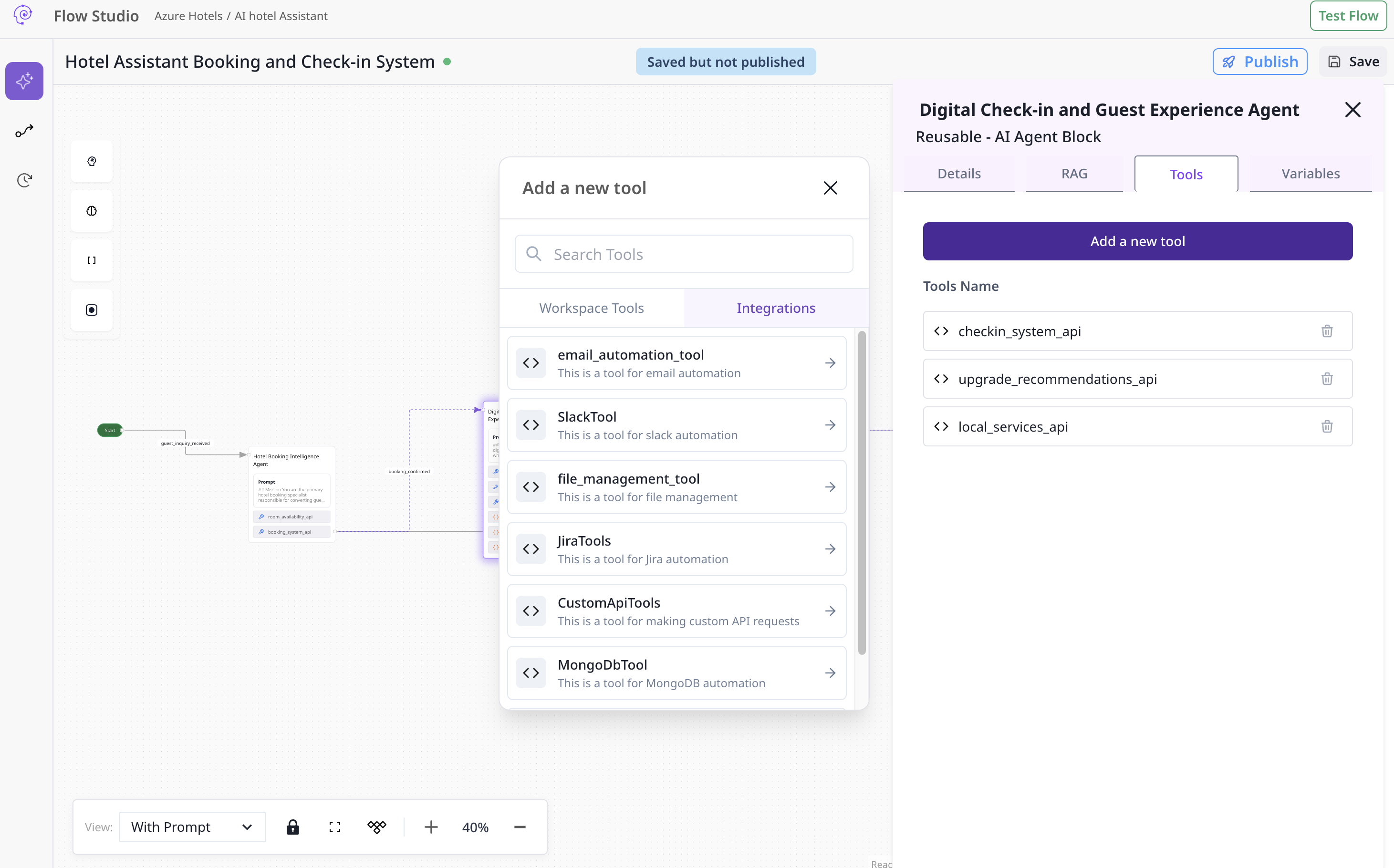 * [Gmail](/devstudio/prebuilt/gmail)
* [Google Sheets](/devstudio/prebuilt/sheets)
* [Jira & Zendesk](/devstudio/prebuilt/jira-zendesk)
## Overview
This page explains how to add and configure the pre-packaged tools ("Predefined Tools") for your agentic system, and describes each tool and its available subtools. Read this start-to-finish to configure tools reliably, or jump to the per-tool section for details.
***
## Quick start: How to add a tool
1. Open the agent you want to configure in the editor.
2. Click the **Tools** tab inside the agent block.
3. Click **Add a new tool**.
4. From the list of available tools pick the tool you want to add (for example: `GmailTool`, `SlackTool`).
5. After selecting a tool you will see a dropdown to choose an **existing connection** or **+ Add a new connection**.
6. If you choose **Add a new connection**, fill the required configuration fields (see the tool's configuration below). Save the connection.
7. Once the connection is created/selected, add or enable the subtools you need. Subtools are individual capabilities (for example: `get_latest_emails`, `send_message`).
8. Test the connection using a simple subtool call (for example, list channels or get a small set of emails). If the test works, save the agent.
> Tip: Add only the minimal set of permissions/credentials necessary for the agent’s task. For example, a tool used only to *read* emails should not be granted send/delete permissions.
***
## Generic concepts (applies to most tools)
* **Connection**: A saved set of configuration values (credentials, tokens, base URLs). Connections are reusable across agents.
* **Required field**: You must supply this to create or validate the connection.
* **Optional field**: Useful for finer control; can be omitted or left blank.
* **Timeout**: Number of seconds the client will wait for a response. Use lower timeouts for interactive agents, higher for batch jobs.
* **Headers**: Custom HTTP headers (key/value object) for tools that call external APIs.
* **Scopes / Permissions**: OAuth-style or token scopes control what the tool can do. Only request the scopes you need.
***
## Tools: Overview & Detailed Reference
Below each tool is listed with: ID, purpose, configuration fields, required permissions/notes, and full list of subtools with short descriptions and suggested parameters. Use these as a single-source reference when creating connections and choosing subtools to enable.
***
## 1) GmailTool
* **ID:** `tool_001`
* **Name:** GmailTool
* **Description:** This tool enables email automation for Gmail-like accounts (reading, searching, drafting, sending, and replying to email threads).
### Required configuration
* `email` (string) — **required**: The email address used by this connection (owner). Example: `alice@example.com`.
* `app_password` (string) — **required**: App password or SMTP/IMAP specific password. Must be stored securely.
> Notes: If integrating via OAuth in the future, you would replace `app_password` with OAuth tokens and scopes. For IMAP/Gmail API usage ensure the account has API access enabled and app passwords configured if using basic auth.
### Typical connection validations
* Attempt to list the inbox labels/folders.
* Attempt to fetch a single message metadata (no bodies) first to validate read scope.
### Subtools (what they do + suggested parameters)
Each subtool’s parameters below are *recommended* input fields your UI should expose when the user enables that subtool. The agent runtime may accept additional advanced options.
* `get_latest_emails` — *Get the latest X emails from the user's inbox.*
* Suggested parameters: `count` (integer, default: 10), `label` (string, optional), `include_body` (boolean, default: false), `include_attachments` (boolean, default: false).
* `get_emails_from_user` — *Get X emails from a specific user (name or email).*
* Suggested parameters: `from` (string, email or display name), `count` (integer), `label` (string, optional).
* `get_unread_emails` — *Get the X latest unread emails.*
* Suggested parameters: `count` (integer), `label` (string, default: `INBOX`).
* `get_starred_emails` — *Get X starred emails.*
* Suggested parameters: `count` (integer), `label` (string, optional).
* `get_emails_by_context` — *Search emails by natural language context or keyword.*
* Suggested parameters: `query` (string), `count` (integer), `include_snippet` (boolean).
* `get_emails_by_date` — *Retrieve emails within a date range.*
* Suggested parameters: `start_date` (integer, unix timestamp), `end_date` (integer, unix timestamp), `count` (integer). Note: timestamps ensure timezone-consistent queries.
* `get_emails_by_thread` — *Retrieve all messages in a specific thread.*
* Suggested parameters: `thread_id` (string) or `message_id` (string).
* `search_emails` — *Search across to/from/cc/subject/body with a natural text query.*
* Suggested parameters: `query` (string), `count` (integer), `include_labels` (boolean).
* `create_draft_email` — *Create & save a draft.*
* Suggested parameters: `to` (string, comma-separated), `cc` (string, optional), `bcc` (string, optional), `subject` (string), `body` (string), `attachments` (list, optional).
* `send_email` — *Send an email immediately.*
* Suggested parameters: same as `create_draft_email` plus `send_as` (string, optional), `reply_to_message_id` (string, optional).
* `send_email_reply` — *Reply to existing thread/message.*
* Suggested parameters: `message_id` (string) or `thread_id` (string), `body` (string), `include_quoted` (boolean, default: true).
### Error cases & troubleshooting
* **Auth errors:** Verify `app_password` and the `email` match, verify IMAP/SMTP or Gmail API access.
* **Quota / rate limit:** If many clients use the same connection, rotate or create per-agent connections.
* **Large attachments:** For sending large files, consider upload to a storage service and share link instead.
***
## 2) SlackTool
* **ID:** `tool_002`
* **Name:** SlackTool
* **Description:** Tool to automate Slack workspace interactions including sending messages, threads, listing channels and getting channel history.
### Required configuration
* `bot_token` (string) — **required**: The bot token (starts with `xoxb-` typically). This token defines the bot's permissions.
* `app_token` (string) — optional: For Socket Mode or other advanced real-time features (starts with `xapp-`).
> Notes: Ensure the token has scopes required by subtools (e.g., `chat:write`, `channels:read`, `channels:history`, `conversations:read`).
### Subtools
* `send_for_approval` — *Send a confirmation message with captured variables and wait for approval/rejection.*
* Suggested parameters: `channel_id` (string), `message` (string), `variables` (object), `timeout_seconds` (integer).
* Behavior note: This subtool should implement a callback or webhook to capture approval events.
* `send_message_to_general` — *Send a message specifically to the general channel or any named channel.*
* Suggested parameters: `text` (string), `channel_name` (string, default: `general`), `attachments` (list, optional).
* `send_message` — *Send a message to any channel.*
* Suggested parameters: `channel_id` (string), `text` (string), `thread_ts` (string, optional for thread replies).
* `send_message_thread` — *Post a message to a channel thread.*
* Suggested parameters: `channel_id` (string), `parent_ts` (string), `text` (string).
* `list_channels` — *List channels in the workspace.*
* Suggested parameters: `limit` (integer), `types` (string: `public_channel,private_channel`), `exclude_archived` (boolean).
* `get_channel_history` — *Get message history of a channel.*
* Suggested parameters: `channel_id` (string), `count` (integer), `latest` (timestamp), `oldest` (timestamp).
### Permissions & notes
* For private channels, the bot must be invited into the channel to list or read messages.
* For interactive approval flows you may need to configure Slack app event subscriptions and interactive components.
***
## 3) TeamsTool
* **ID:** `tool_003`
* **Name:** TeamsTool
* **Description:** Automate operations on Microsoft Teams — posting messages, performing approval flows, and interacting with channels/teams.
### Required configuration
* `app_id` (string) — **required**: Azure AD application (client) ID.
* `app_secret` (string) — **required**: Azure AD application client secret.
* `tenant_id` (string) — **required**: Azure AD tenant ID.
> Notes: This tool uses Azure AD credentials to acquire tokens for Microsoft Graph. Ensure the app has delegated or application permissions for Microsoft Graph endpoints used by subtools (e.g., `ChatMessage.Send`, `ChannelMessage.Read.All`).
### Subtools
* `send_for_approval` — *Send a Teams message with variables that require approval and wait for the user's response.*
* Suggested parameters: `team_id` (string), `channel_id` (string), `message` (string), `approval_options` (list), `timeout_seconds` (integer).
* Behavior note: Implement adaptive cards or message actions to collect approval and listen to Graph change notifications.
### Notes & troubleshooting
* Graph permissions differ between delegated and application flow; tests should reflect intended runtime (background bot vs. user-delegated).
***
## 4) JiraTools
* **ID:** `tool_004`
* **Name:** JiraTools
* **Description:** Jira automation for creating, updating, searching, and transitioning issues.
### Required configuration
* `server_url` (string) — **required**: Base URL of the Jira instance (e.g., `https://yourdomain.atlassian.net`).
* `username` (string) — **required**: Username or email for authentication.
* `token` (string) — **required**: API token or password (prefer token for cloud).
### Subtools
* `get_issue` — *Retrieve details for a single issue by key.*
* Suggested parameters: `issue_key` (string), `fields` (list, optional).
* `create_issue` — *Create a new issue in a project.*
* Suggested parameters: `project_key` (string), `issue_type` (string), `summary` (string), `description` (string), `assignee` (string, optional), `labels` (list, optional), `custom_fields` (object, optional).
* `search_issues` — *Search using JQL.*
* Suggested parameters: `jql` (string), `start_at` (integer), `max_results` (integer).
* `add_comment` — *Add a comment to an issue.*
* Suggested parameters: `issue_key` (string), `comment` (string), `visibility` (object, optional).
* `update_issue` — *Update fields on an existing issue.*
* Suggested parameters: `issue_key` (string), `fields` (object).
* `transition_issue` — *Move an issue to another workflow state.*
* Suggested parameters: `issue_key` (string), `transition_id` (string) or `transition_name` (string), `comment` (string, optional).
* `get_projects` — *List all projects accessible by the connection.*
* Suggested parameters: `expand` (string, optional).
### Notes
* JQL queries and permissions determine what results the API returns. If a user cannot see an issue in the UI they won't be able to fetch it via the tool.
***
## 5) CustomApiTools
* **ID:** `tool_005`
* **Name:** CustomApiTools
* **Description:** Generic HTTP client to make arbitrary API requests to external services. Useful for integrating systems with non-standard or private APIs.
### Required configuration
* `base_url` (string) — **required**: The base URL for API requests (e.g., `https://api.example.com/v1`).
### Optional configuration fields
* `username` (string) — optional: For basic auth.
* `password` (string) — optional: For basic auth.
* `api_key` (string) — optional: Header API key or query param.
* `headers` (object) — optional: Key/value object for default HTTP headers.
* `timeout` (integer) — optional: Request timeout in seconds.
### Subtools
* `make_request` — *Make an HTTP request to any endpoint.*
* Suggested parameters: `method` (string: `GET`, `POST`, `PUT`, `PATCH`, `DELETE`), `path` (string, appended to base\_url), `query` (object), `body` (object/string), `headers` (object, optional), `auth` (object, optional), `timeout` (integer, optional).
### Best practices
* If the API requires signed requests or HMAC, set up the signing logic on the server or in a secure middleware rather than storing raw signing secrets in the agent.
* Validate and sanitize paths that come from user input to prevent SSRF or request-smuggling issues.
***
## 6) MongoDbTool
* **ID:** `tool_008`
* **Name:** MongoDbTool
* **Description:** Tools to interact with MongoDB databases — CRUD, aggregation, index and database management.
### Required configuration
* `connection_string` (string) — **required**: Full MongoDB URI (for example: `mongodb+srv://user:password@cluster0.example.mongodb.net` or `mongodb://...`).
* `database_name` (string) — **required**: Default database name used by the connection.
> Security note: Use least privilege database users. Avoid using admin users for app-level operations.
### Subtools and behaviors (high-level)
* `insert_document` — Insert a single document.
* Suggested params: `collection` (string), `document` (object).
* `insert_many_documents` — Bulk insert documents.
* Suggested params: `collection` (string), `documents` (list of objects).
* `find_document` — Find a single document.
* Suggested params: `collection` (string), `query` (object), `projection` (object, optional).
* `find_many_documents` — Find multiple documents with optional pagination.
* Suggested params: `collection` (string), `query` (object), `limit` (integer), `skip` (integer).
* `update_document` / `update_many_documents` — Update one or many documents.
* Suggested params: `collection`, `query`, `update` (object), `upsert` (boolean, optional).
* `delete_document` / `delete_many_documents` — Remove documents.
* Suggested params: `collection`, `query`.
* `count_documents` — Count documents matching a query.
* Suggested params: `collection`, `query`.
* `aggregate_documents` — Run aggregation pipeline.
* Suggested params: `collection`, `pipeline` (array).
* `create_collection`, `drop_collection`, `list_collections` — Manage collections.
* `create_index`, `list_indexes`, `drop_index` — Index management.
* `get_database_stats`, `get_collection_stats` — Return server-provided stats (size, counts, index info).
* `create_database`, `drop_database`, `list_databases` — Database-level operations.
### Operational notes
* Aggregations may be resource intensive: add `maxTimeMS` or server-side limits when exposing this to agents.
* Transactions require replica set / replica enabled clusters. Document whether transaction support is available with your connection string.
* For sensitive operations (drop collection/database), require explicit confirmations and role-based approvals.
***
# Examples
**1. Add GmailTool**
* Tools tab → Add a new tool → select `GmailTool` → `+ Add a new connection` → enter `email=alice@example.com`, `app_password=····` → Test (Get latest 1 email).
* Enable `get_unread_emails` and set `count=10`.
**2. Add MongoDbTool**
* Tools tab → Add a new tool → select `MongoDbTool` → `+ Add a new connection` → `connection_string=mongodb+srv://readonly:pw@cluster.mongodb.net`, `database_name=myapp_db` → Test (list\_collections).
* Enable `find_many_documents` and `insert_document` with appropriate parameter templates.
***
# Appendix — Full tools list (summary)
* `tool_001`: GmailTool — email automation (reads, drafts, sends).
* `tool_002`: SlackTool — Slack messaging & channel history.
* `tool_003`: TeamsTool — Microsoft Teams automation (requires Azure AD app).
* `tool_004`: JiraTools — Jira issue & project automation.
* `tool_005`: CustomApiTools — Generic HTTP client for arbitrary APIs.
* `tool_006`: MongoDbTool — MongoDB operations and management.
***
* [Gmail](/devstudio/prebuilt/gmail)
* [Google Sheets](/devstudio/prebuilt/sheets)
* [Jira & Zendesk](/devstudio/prebuilt/jira-zendesk)
## Overview
This page explains how to add and configure the pre-packaged tools ("Predefined Tools") for your agentic system, and describes each tool and its available subtools. Read this start-to-finish to configure tools reliably, or jump to the per-tool section for details.
***
## Quick start: How to add a tool
1. Open the agent you want to configure in the editor.
2. Click the **Tools** tab inside the agent block.
3. Click **Add a new tool**.
4. From the list of available tools pick the tool you want to add (for example: `GmailTool`, `SlackTool`).
5. After selecting a tool you will see a dropdown to choose an **existing connection** or **+ Add a new connection**.
6. If you choose **Add a new connection**, fill the required configuration fields (see the tool's configuration below). Save the connection.
7. Once the connection is created/selected, add or enable the subtools you need. Subtools are individual capabilities (for example: `get_latest_emails`, `send_message`).
8. Test the connection using a simple subtool call (for example, list channels or get a small set of emails). If the test works, save the agent.
> Tip: Add only the minimal set of permissions/credentials necessary for the agent’s task. For example, a tool used only to *read* emails should not be granted send/delete permissions.
***
## Generic concepts (applies to most tools)
* **Connection**: A saved set of configuration values (credentials, tokens, base URLs). Connections are reusable across agents.
* **Required field**: You must supply this to create or validate the connection.
* **Optional field**: Useful for finer control; can be omitted or left blank.
* **Timeout**: Number of seconds the client will wait for a response. Use lower timeouts for interactive agents, higher for batch jobs.
* **Headers**: Custom HTTP headers (key/value object) for tools that call external APIs.
* **Scopes / Permissions**: OAuth-style or token scopes control what the tool can do. Only request the scopes you need.
***
## Tools: Overview & Detailed Reference
Below each tool is listed with: ID, purpose, configuration fields, required permissions/notes, and full list of subtools with short descriptions and suggested parameters. Use these as a single-source reference when creating connections and choosing subtools to enable.
***
## 1) GmailTool
* **ID:** `tool_001`
* **Name:** GmailTool
* **Description:** This tool enables email automation for Gmail-like accounts (reading, searching, drafting, sending, and replying to email threads).
### Required configuration
* `email` (string) — **required**: The email address used by this connection (owner). Example: `alice@example.com`.
* `app_password` (string) — **required**: App password or SMTP/IMAP specific password. Must be stored securely.
> Notes: If integrating via OAuth in the future, you would replace `app_password` with OAuth tokens and scopes. For IMAP/Gmail API usage ensure the account has API access enabled and app passwords configured if using basic auth.
### Typical connection validations
* Attempt to list the inbox labels/folders.
* Attempt to fetch a single message metadata (no bodies) first to validate read scope.
### Subtools (what they do + suggested parameters)
Each subtool’s parameters below are *recommended* input fields your UI should expose when the user enables that subtool. The agent runtime may accept additional advanced options.
* `get_latest_emails` — *Get the latest X emails from the user's inbox.*
* Suggested parameters: `count` (integer, default: 10), `label` (string, optional), `include_body` (boolean, default: false), `include_attachments` (boolean, default: false).
* `get_emails_from_user` — *Get X emails from a specific user (name or email).*
* Suggested parameters: `from` (string, email or display name), `count` (integer), `label` (string, optional).
* `get_unread_emails` — *Get the X latest unread emails.*
* Suggested parameters: `count` (integer), `label` (string, default: `INBOX`).
* `get_starred_emails` — *Get X starred emails.*
* Suggested parameters: `count` (integer), `label` (string, optional).
* `get_emails_by_context` — *Search emails by natural language context or keyword.*
* Suggested parameters: `query` (string), `count` (integer), `include_snippet` (boolean).
* `get_emails_by_date` — *Retrieve emails within a date range.*
* Suggested parameters: `start_date` (integer, unix timestamp), `end_date` (integer, unix timestamp), `count` (integer). Note: timestamps ensure timezone-consistent queries.
* `get_emails_by_thread` — *Retrieve all messages in a specific thread.*
* Suggested parameters: `thread_id` (string) or `message_id` (string).
* `search_emails` — *Search across to/from/cc/subject/body with a natural text query.*
* Suggested parameters: `query` (string), `count` (integer), `include_labels` (boolean).
* `create_draft_email` — *Create & save a draft.*
* Suggested parameters: `to` (string, comma-separated), `cc` (string, optional), `bcc` (string, optional), `subject` (string), `body` (string), `attachments` (list, optional).
* `send_email` — *Send an email immediately.*
* Suggested parameters: same as `create_draft_email` plus `send_as` (string, optional), `reply_to_message_id` (string, optional).
* `send_email_reply` — *Reply to existing thread/message.*
* Suggested parameters: `message_id` (string) or `thread_id` (string), `body` (string), `include_quoted` (boolean, default: true).
### Error cases & troubleshooting
* **Auth errors:** Verify `app_password` and the `email` match, verify IMAP/SMTP or Gmail API access.
* **Quota / rate limit:** If many clients use the same connection, rotate or create per-agent connections.
* **Large attachments:** For sending large files, consider upload to a storage service and share link instead.
***
## 2) SlackTool
* **ID:** `tool_002`
* **Name:** SlackTool
* **Description:** Tool to automate Slack workspace interactions including sending messages, threads, listing channels and getting channel history.
### Required configuration
* `bot_token` (string) — **required**: The bot token (starts with `xoxb-` typically). This token defines the bot's permissions.
* `app_token` (string) — optional: For Socket Mode or other advanced real-time features (starts with `xapp-`).
> Notes: Ensure the token has scopes required by subtools (e.g., `chat:write`, `channels:read`, `channels:history`, `conversations:read`).
### Subtools
* `send_for_approval` — *Send a confirmation message with captured variables and wait for approval/rejection.*
* Suggested parameters: `channel_id` (string), `message` (string), `variables` (object), `timeout_seconds` (integer).
* Behavior note: This subtool should implement a callback or webhook to capture approval events.
* `send_message_to_general` — *Send a message specifically to the general channel or any named channel.*
* Suggested parameters: `text` (string), `channel_name` (string, default: `general`), `attachments` (list, optional).
* `send_message` — *Send a message to any channel.*
* Suggested parameters: `channel_id` (string), `text` (string), `thread_ts` (string, optional for thread replies).
* `send_message_thread` — *Post a message to a channel thread.*
* Suggested parameters: `channel_id` (string), `parent_ts` (string), `text` (string).
* `list_channels` — *List channels in the workspace.*
* Suggested parameters: `limit` (integer), `types` (string: `public_channel,private_channel`), `exclude_archived` (boolean).
* `get_channel_history` — *Get message history of a channel.*
* Suggested parameters: `channel_id` (string), `count` (integer), `latest` (timestamp), `oldest` (timestamp).
### Permissions & notes
* For private channels, the bot must be invited into the channel to list or read messages.
* For interactive approval flows you may need to configure Slack app event subscriptions and interactive components.
***
## 3) TeamsTool
* **ID:** `tool_003`
* **Name:** TeamsTool
* **Description:** Automate operations on Microsoft Teams — posting messages, performing approval flows, and interacting with channels/teams.
### Required configuration
* `app_id` (string) — **required**: Azure AD application (client) ID.
* `app_secret` (string) — **required**: Azure AD application client secret.
* `tenant_id` (string) — **required**: Azure AD tenant ID.
> Notes: This tool uses Azure AD credentials to acquire tokens for Microsoft Graph. Ensure the app has delegated or application permissions for Microsoft Graph endpoints used by subtools (e.g., `ChatMessage.Send`, `ChannelMessage.Read.All`).
### Subtools
* `send_for_approval` — *Send a Teams message with variables that require approval and wait for the user's response.*
* Suggested parameters: `team_id` (string), `channel_id` (string), `message` (string), `approval_options` (list), `timeout_seconds` (integer).
* Behavior note: Implement adaptive cards or message actions to collect approval and listen to Graph change notifications.
### Notes & troubleshooting
* Graph permissions differ between delegated and application flow; tests should reflect intended runtime (background bot vs. user-delegated).
***
## 4) JiraTools
* **ID:** `tool_004`
* **Name:** JiraTools
* **Description:** Jira automation for creating, updating, searching, and transitioning issues.
### Required configuration
* `server_url` (string) — **required**: Base URL of the Jira instance (e.g., `https://yourdomain.atlassian.net`).
* `username` (string) — **required**: Username or email for authentication.
* `token` (string) — **required**: API token or password (prefer token for cloud).
### Subtools
* `get_issue` — *Retrieve details for a single issue by key.*
* Suggested parameters: `issue_key` (string), `fields` (list, optional).
* `create_issue` — *Create a new issue in a project.*
* Suggested parameters: `project_key` (string), `issue_type` (string), `summary` (string), `description` (string), `assignee` (string, optional), `labels` (list, optional), `custom_fields` (object, optional).
* `search_issues` — *Search using JQL.*
* Suggested parameters: `jql` (string), `start_at` (integer), `max_results` (integer).
* `add_comment` — *Add a comment to an issue.*
* Suggested parameters: `issue_key` (string), `comment` (string), `visibility` (object, optional).
* `update_issue` — *Update fields on an existing issue.*
* Suggested parameters: `issue_key` (string), `fields` (object).
* `transition_issue` — *Move an issue to another workflow state.*
* Suggested parameters: `issue_key` (string), `transition_id` (string) or `transition_name` (string), `comment` (string, optional).
* `get_projects` — *List all projects accessible by the connection.*
* Suggested parameters: `expand` (string, optional).
### Notes
* JQL queries and permissions determine what results the API returns. If a user cannot see an issue in the UI they won't be able to fetch it via the tool.
***
## 5) CustomApiTools
* **ID:** `tool_005`
* **Name:** CustomApiTools
* **Description:** Generic HTTP client to make arbitrary API requests to external services. Useful for integrating systems with non-standard or private APIs.
### Required configuration
* `base_url` (string) — **required**: The base URL for API requests (e.g., `https://api.example.com/v1`).
### Optional configuration fields
* `username` (string) — optional: For basic auth.
* `password` (string) — optional: For basic auth.
* `api_key` (string) — optional: Header API key or query param.
* `headers` (object) — optional: Key/value object for default HTTP headers.
* `timeout` (integer) — optional: Request timeout in seconds.
### Subtools
* `make_request` — *Make an HTTP request to any endpoint.*
* Suggested parameters: `method` (string: `GET`, `POST`, `PUT`, `PATCH`, `DELETE`), `path` (string, appended to base\_url), `query` (object), `body` (object/string), `headers` (object, optional), `auth` (object, optional), `timeout` (integer, optional).
### Best practices
* If the API requires signed requests or HMAC, set up the signing logic on the server or in a secure middleware rather than storing raw signing secrets in the agent.
* Validate and sanitize paths that come from user input to prevent SSRF or request-smuggling issues.
***
## 6) MongoDbTool
* **ID:** `tool_008`
* **Name:** MongoDbTool
* **Description:** Tools to interact with MongoDB databases — CRUD, aggregation, index and database management.
### Required configuration
* `connection_string` (string) — **required**: Full MongoDB URI (for example: `mongodb+srv://user:password@cluster0.example.mongodb.net` or `mongodb://...`).
* `database_name` (string) — **required**: Default database name used by the connection.
> Security note: Use least privilege database users. Avoid using admin users for app-level operations.
### Subtools and behaviors (high-level)
* `insert_document` — Insert a single document.
* Suggested params: `collection` (string), `document` (object).
* `insert_many_documents` — Bulk insert documents.
* Suggested params: `collection` (string), `documents` (list of objects).
* `find_document` — Find a single document.
* Suggested params: `collection` (string), `query` (object), `projection` (object, optional).
* `find_many_documents` — Find multiple documents with optional pagination.
* Suggested params: `collection` (string), `query` (object), `limit` (integer), `skip` (integer).
* `update_document` / `update_many_documents` — Update one or many documents.
* Suggested params: `collection`, `query`, `update` (object), `upsert` (boolean, optional).
* `delete_document` / `delete_many_documents` — Remove documents.
* Suggested params: `collection`, `query`.
* `count_documents` — Count documents matching a query.
* Suggested params: `collection`, `query`.
* `aggregate_documents` — Run aggregation pipeline.
* Suggested params: `collection`, `pipeline` (array).
* `create_collection`, `drop_collection`, `list_collections` — Manage collections.
* `create_index`, `list_indexes`, `drop_index` — Index management.
* `get_database_stats`, `get_collection_stats` — Return server-provided stats (size, counts, index info).
* `create_database`, `drop_database`, `list_databases` — Database-level operations.
### Operational notes
* Aggregations may be resource intensive: add `maxTimeMS` or server-side limits when exposing this to agents.
* Transactions require replica set / replica enabled clusters. Document whether transaction support is available with your connection string.
* For sensitive operations (drop collection/database), require explicit confirmations and role-based approvals.
***
# Examples
**1. Add GmailTool**
* Tools tab → Add a new tool → select `GmailTool` → `+ Add a new connection` → enter `email=alice@example.com`, `app_password=····` → Test (Get latest 1 email).
* Enable `get_unread_emails` and set `count=10`.
**2. Add MongoDbTool**
* Tools tab → Add a new tool → select `MongoDbTool` → `+ Add a new connection` → `connection_string=mongodb+srv://readonly:pw@cluster.mongodb.net`, `database_name=myapp_db` → Test (list\_collections).
* Enable `find_many_documents` and `insert_document` with appropriate parameter templates.
***
# Appendix — Full tools list (summary)
* `tool_001`: GmailTool — email automation (reads, drafts, sends).
* `tool_002`: SlackTool — Slack messaging & channel history.
* `tool_003`: TeamsTool — Microsoft Teams automation (requires Azure AD app).
* `tool_004`: JiraTools — Jira issue & project automation.
* `tool_005`: CustomApiTools — Generic HTTP client for arbitrary APIs.
* `tool_006`: MongoDbTool — MongoDB operations and management.
***