> ## Documentation Index
> Fetch the complete documentation index at: https://docs.phinite.ai/llms.txt
> Use this file to discover all available pages before exploring further.
# Env. variables
> DEV, UAT, and PROD environment variables for builds and integrations.
**Env. variables** store secrets and config per **environment** (DEV, UAT, PROD). **Agent Builds** and integrations read these at runtime — values are not stored on the **Agent Graph** canvas.
Sensitive values display masked in the table. Tools and channels reference env keys by name — keep naming consistent across DEV → PROD promotion. Permission: `workspace.sidebar.environment`.
## Where in the product
| Surface | Path |
| ----------------- | -------------------------------------------------------------------------- |
| Workspace sidebar | **Env. variables** |
| URL | `/{org}/workspace/{workspaceId}/environment` |
| Build assign | Graph Studio → **Deploy** / **Agent Builds** → assign build to environment |
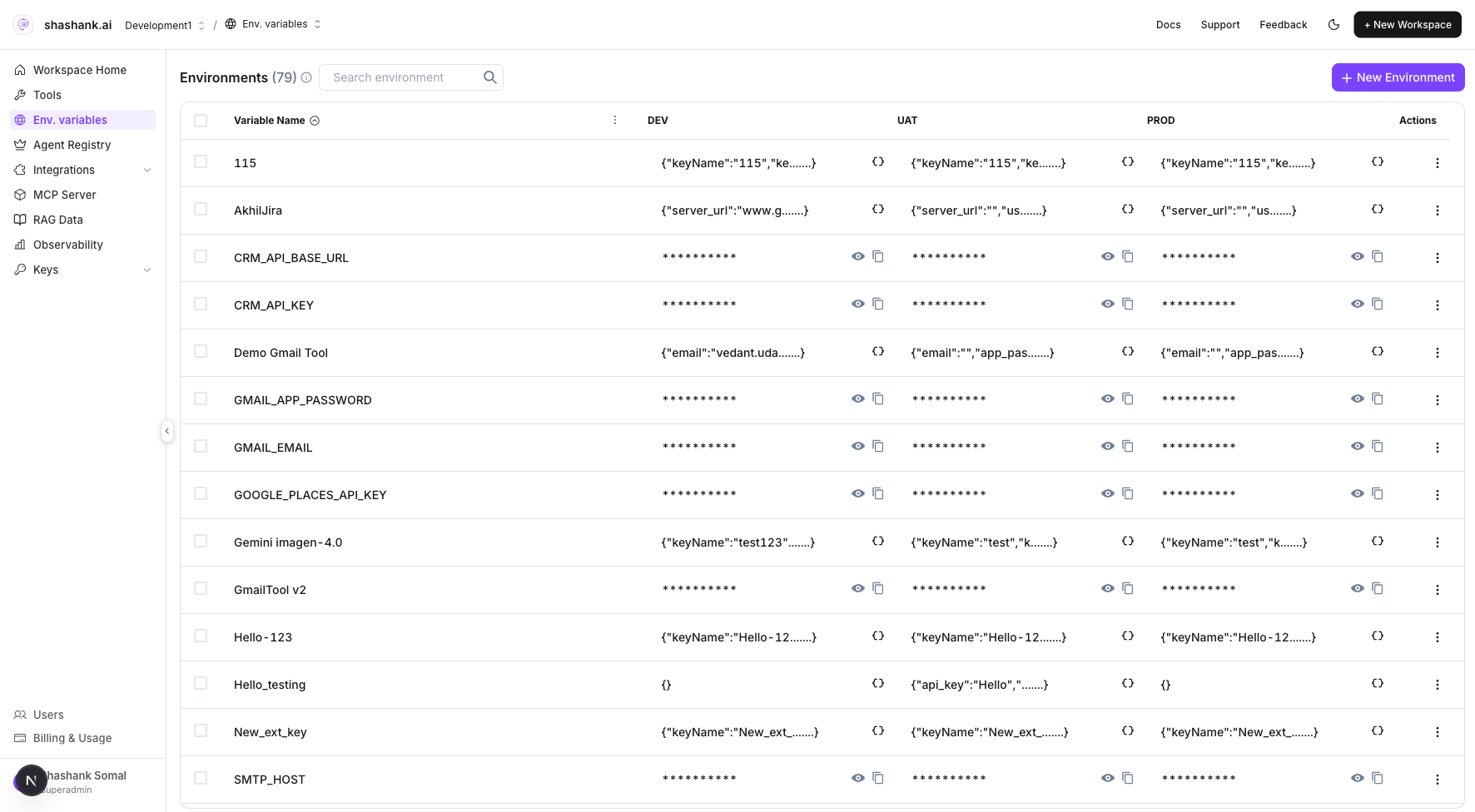 ## Configure variables
1. Open **Env. variables** from the workspace sidebar.
2. Click **New Environment** or edit an existing variable row.
3. Enter **Variable Name** and values for **DEV**, **UAT**, and **PROD** as needed.
4. Save each row.
5. When deploying, assign the **Agent Build** to the environment whose values you configured ([Builds & environments](/builds/environments)).
Keep variable **names** consistent across DEV → PROD. Only the **values** should change (API keys, base URLs, feature flags).
## Related
All configuration layers in one place.
Pin tools, MCP, and env into immutable builds.
Assign builds to DEV, UAT, and PROD.
Channels, triggers, and predefined tools.
## Configure variables
1. Open **Env. variables** from the workspace sidebar.
2. Click **New Environment** or edit an existing variable row.
3. Enter **Variable Name** and values for **DEV**, **UAT**, and **PROD** as needed.
4. Save each row.
5. When deploying, assign the **Agent Build** to the environment whose values you configured ([Builds & environments](/builds/environments)).
Keep variable **names** consistent across DEV → PROD. Only the **values** should change (API keys, base URLs, feature flags).
## Related
All configuration layers in one place.
Pin tools, MCP, and env into immutable builds.
Assign builds to DEV, UAT, and PROD.
Channels, triggers, and predefined tools.