> ## Documentation Index
> Fetch the complete documentation index at: https://docs.phinite.ai/llms.txt
> Use this file to discover all available pages before exploring further.
# Build export configuration
> Export tools, MCP, and env variables into builds and Agent Card versions.
When you **Build** or **Expose as A2A**, you can export additional **tools**, **MCP** connections, and **environment variables** into the immutable **Agent Build** snapshot. This ensures deployed agents and **Agent Card** versions carry the integrations external callers need.
Export is optional for standard channel and trigger deploys. Use it when A2A callers or registry **Browse** nodes need tool credentials bundled with the registration build.
## Where in the product
| Wizard | Step | UI label |
| ----------------- | -------------------------- | -------------------------------------------------------------------------- |
| **Build Agent** | After graph + tools review | Tool version pinning; unpublished tools show **Publish** |
| **Expose as A2A** | Step 2 (before Agent Card) | **Export value for agent version** — tabs **Predefined**, **MCP**, **Env** |
| **Expose as A2A** | Step 3 | **Agent Card** identity ([Agent Cards](/agent-registry/agent-cards)) |
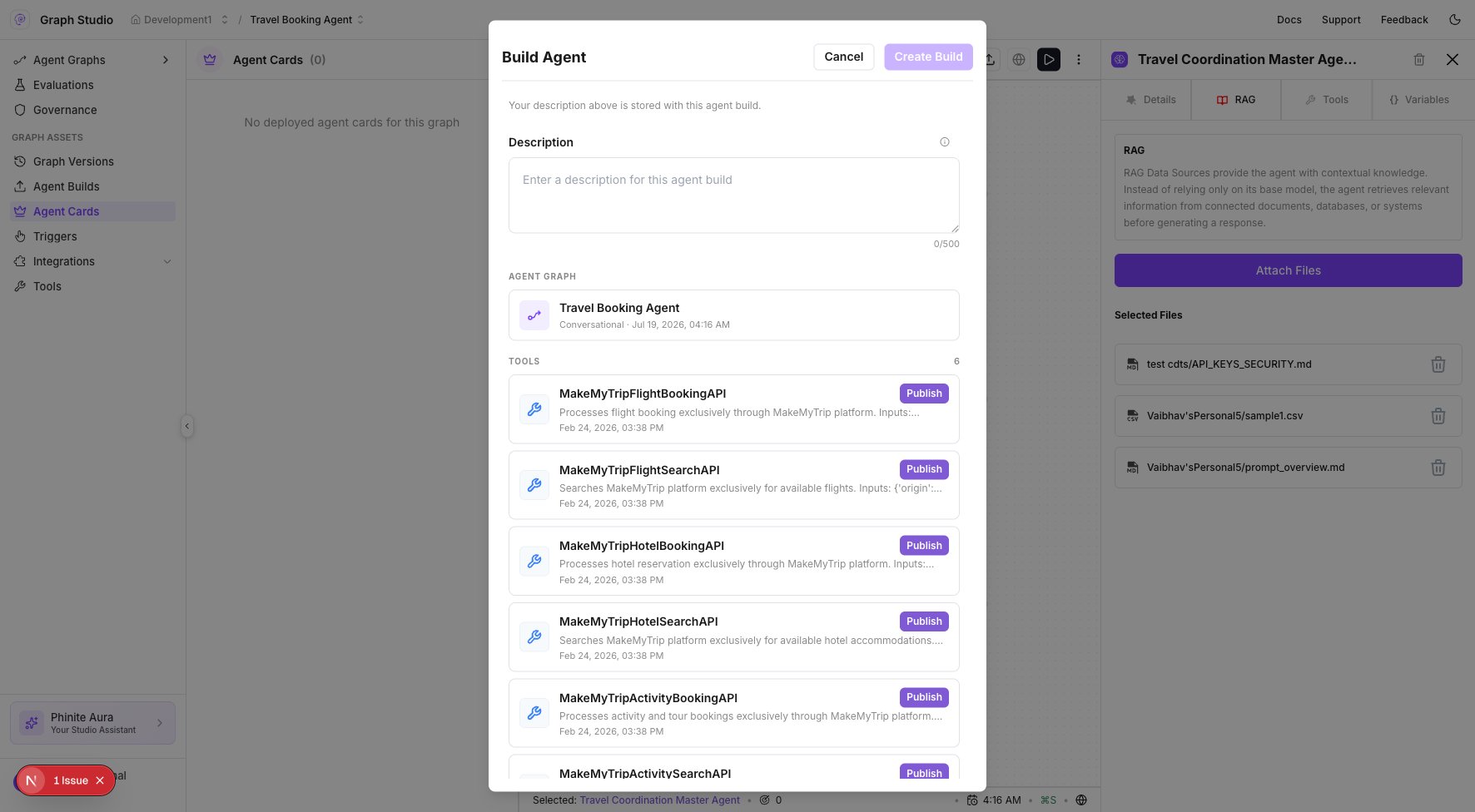 ## Build wizard
1. Click **Build** in Graph Studio (the **Agent Graph** must be **Saved**).
2. Wait for validation and the **Build Agent** form.
3. Add a **Description**.
4. Confirm **AGENT GRAPH** version and **TOOLS** — publish any tool showing **Publish**.
5. Click **Create Build**.
## Export in Expose wizard
1. Start **Deploy** → **Deploy as A2A** (or expose flow from **Agent Builds**).
2. Complete **Agent Build Config** (Agent Graph + tools).
3. On the export step, enable **Export value for agent version**.
4. Use tabs **Predefined**, **MCP**, **Env** and search **Search tools and variables...**
5. For each exported row, provide a **description** (required).
6. Continue to the **Agent Card** step and submit.
## When to export
* External A2A callers need tool credentials bundled with the **Agent Card** version.
* Registry **Browse** nodes require `config_id` and satisfied tool/env on the registration build.
* A trigger or channel deploy must carry MCP connections not already on the **Agent Graph**.
## Related
Create and manage Agent Builds.
TEST and LIVE Agent Card versions.
DEV / UAT / PROD secrets and config.
Register an Agent Graph over A2A.
## Build wizard
1. Click **Build** in Graph Studio (the **Agent Graph** must be **Saved**).
2. Wait for validation and the **Build Agent** form.
3. Add a **Description**.
4. Confirm **AGENT GRAPH** version and **TOOLS** — publish any tool showing **Publish**.
5. Click **Create Build**.
## Export in Expose wizard
1. Start **Deploy** → **Deploy as A2A** (or expose flow from **Agent Builds**).
2. Complete **Agent Build Config** (Agent Graph + tools).
3. On the export step, enable **Export value for agent version**.
4. Use tabs **Predefined**, **MCP**, **Env** and search **Search tools and variables...**
5. For each exported row, provide a **description** (required).
6. Continue to the **Agent Card** step and submit.
## When to export
* External A2A callers need tool credentials bundled with the **Agent Card** version.
* Registry **Browse** nodes require `config_id` and satisfied tool/env on the registration build.
* A trigger or channel deploy must carry MCP connections not already on the **Agent Graph**.
## Related
Create and manage Agent Builds.
TEST and LIVE Agent Card versions.
DEV / UAT / PROD secrets and config.
Register an Agent Graph over A2A.