> ## Documentation Index
> Fetch the complete documentation index at: https://docs.phinite.ai/llms.txt
> Use this file to discover all available pages before exploring further.
# Overview
# Assistants
Assistants are the core of Phinite. Everything revolves around them.\
They are intelligent, multi-skilled entities that automate conversations, workflows, and business operations across channels.
An **Assistant** brings together multiple components — **Agent Graphs, Intents, Triggers, Tools, Environments, Builds, and Aurs** — to function as a cohesive unit.\
Each component plays a distinct role in defining how the Assistant behaves, interacts, and executes tasks.
### Types of Assistants
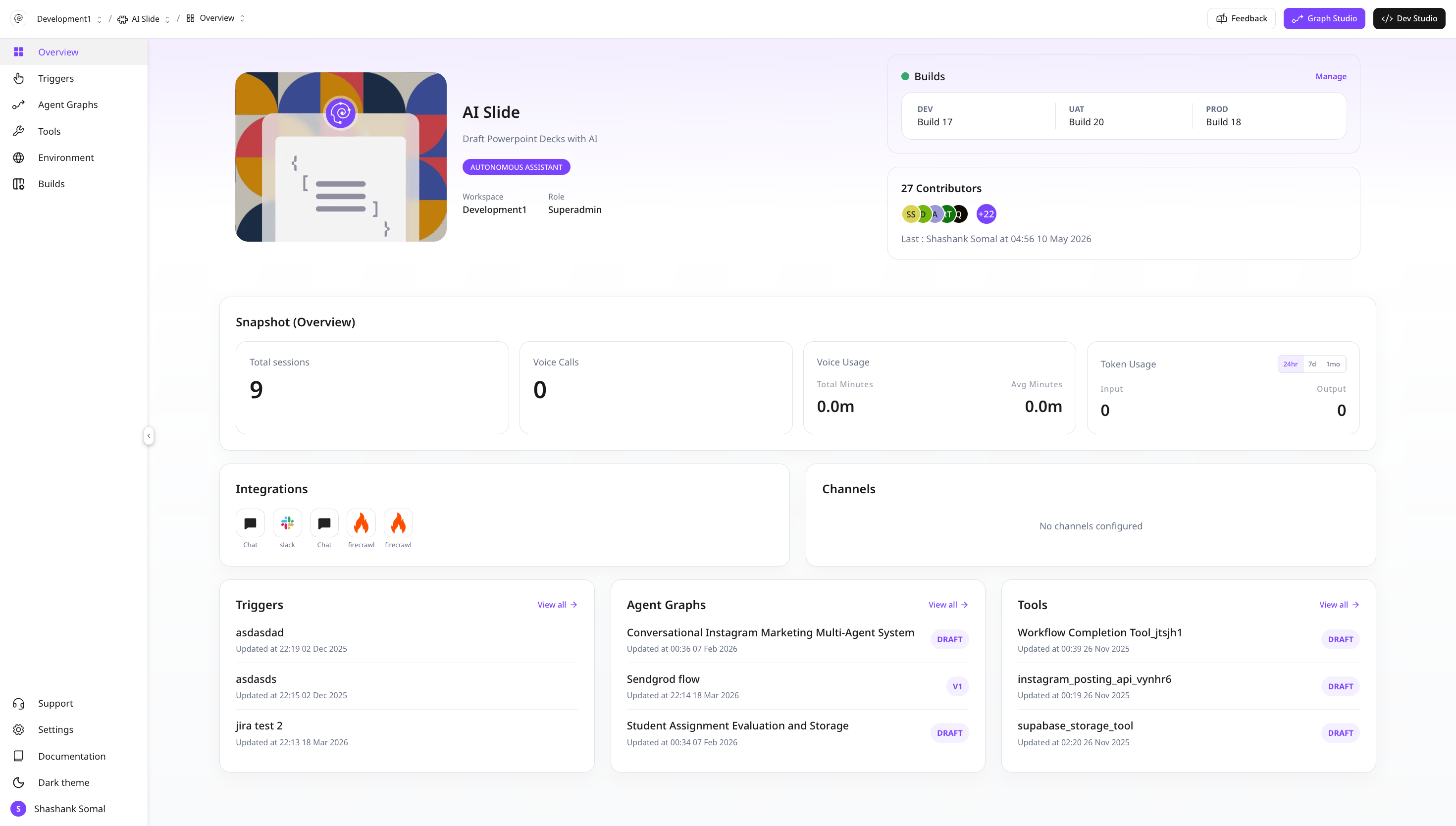
An assistant is an AI-powered capability that handles user interactions, api, background tasks and cron job using your workflows and tools.
* **Conversational Assistants**: Chat and voice experiences
* **Email Assistants**: Inbox automation for triage and replies
* **Autonomous Assistants**: Scheduled or event-driven background jobs or apis
 ### Comparision
| Type | Best for | Triggers | Channels |
| :------------- | :------------------------- | :------------------- | :------------------------------------------------ |
| Conversational | Real-time chat/voice | Intents, chat events | Web Chat, WhatsApp, Slack, Teams, Twilio |
| Email | Asynchronous communication | Inbound email | Email |
| Autonomous | Background automation | Schedules, webhooks | Custom APIs(Background Task, Api, Cron Job), Jira |
## 🧩 Core Architecture
The heart of the Assistant — a visual workflow created in **Graph Studio**.\
AgentGraphs connect intents, triggers, and tools to define your automation logic.
Natural language or programmatic cues that tell the Assistant *what the user wants*.\
Each intent can be AI-generated and linked to a specific flow.
Event-driven or scheduled conditions that automatically initiate a workflow. These triggers can originate from APIs, system events, or predefined schedules. Supports channel selection (for example, Jira), allowing direct webhook integration to trigger the process automatically.
Hybrid initiators combine intent detection with trigger-based logic, making them ideal for scenarios where both a user action and a system event determine how a flow is initiated. They trigger the Intent API to start the conversation flow in the selected channel.
Reusable building blocks maintained by developers in **DevStudio**.\
They perform complex logic implementation, data processing, heavy code operation or data transformations.
Isolated spaces for development, staging, and production deployment.\
Each environment controls visibility, access, and execution logs. Utilized by custom tools.
Snapshot versions of an Assistant. Builds preserve dependencies, flows, and configurations across environments for controlled release and rollback.
AI-powered assistant that helps you generate agent graphs.\
It understands context and build and edits agent nodes intelligently.
Expose published agent graphs as discoverable **Agent Cards**, browse the workspace catalog, and compose multi-agent flows with **Browse** or **Discovery** registry nodes.
***
## ⚙️ How an Assistant Works
Each Assistant operates as a closed loop of logic and action.
1. **Trigger or Intent fires**
* Initiates a **Agent Graph**.
2. **Agent Graph executes**
* Moves across blocks — Agent, Tool, Logic, or Connector.
3. **Tools perform operations**
* API calls, data validation, transformations.
4. **Responses return to the user or system**
* Completing the workflow cycle.
5. **Logs and observability**
* All executions are tracked under the **Environment** dashboard.
***
## 💡 Creating an Assistant
Navigate to your workspace and select **Create Assistant**.
Choose between **Conversational**, **Autonomous**, or \*\*Email \*\*assistants.
Open **Graph Studio** to visually create the graph using Agents Node.
Each flow must be linked to a **Trigger** or **Intent(depending on assistant type)** to define its entry point.
Add logic or data connectors from **DevStudio**’s tool library.
Assign environment settings for Dev, UAT, or Production.
Finalize and attach environment the Assistant as a versioned build.
***
## 🤖 Aura
Aura accelerates assistant creation by generating agent graphs, tools using natural language.
### Usage
* Ask: *“Create a flow to schedule a site visit and confirm via email.”*
* Aura will suggest and build the structure, tool connections, and agent messages.
* You can edit or refine before deploying.
***
## 🧭 Summary
Assistants in Phinite unify conversation, automation, and integration into a single, agentic architecture.\
They connect human intent with machine precision — through agent graph, tools, and triggers — to deliver intelligent, observable, and scalable outcomes.
Everything in Phinite starts and ends with an Assistants.\
Design it well — and every automation across your workspace becomes effortless.
## Next steps
* Explore [Types of Assistants](/assistants/types)
* Review [Assistant Components](/assistants/components)
* Build your first flow in [Graph Studio](/graph-studio/overview)
* Expose agents for external discovery in [Agent Registry](/agent-registry/overview)
### Comparision
| Type | Best for | Triggers | Channels |
| :------------- | :------------------------- | :------------------- | :------------------------------------------------ |
| Conversational | Real-time chat/voice | Intents, chat events | Web Chat, WhatsApp, Slack, Teams, Twilio |
| Email | Asynchronous communication | Inbound email | Email |
| Autonomous | Background automation | Schedules, webhooks | Custom APIs(Background Task, Api, Cron Job), Jira |
## 🧩 Core Architecture
The heart of the Assistant — a visual workflow created in **Graph Studio**.\
AgentGraphs connect intents, triggers, and tools to define your automation logic.
Natural language or programmatic cues that tell the Assistant *what the user wants*.\
Each intent can be AI-generated and linked to a specific flow.
Event-driven or scheduled conditions that automatically initiate a workflow. These triggers can originate from APIs, system events, or predefined schedules. Supports channel selection (for example, Jira), allowing direct webhook integration to trigger the process automatically.
Hybrid initiators combine intent detection with trigger-based logic, making them ideal for scenarios where both a user action and a system event determine how a flow is initiated. They trigger the Intent API to start the conversation flow in the selected channel.
Reusable building blocks maintained by developers in **DevStudio**.\
They perform complex logic implementation, data processing, heavy code operation or data transformations.
Isolated spaces for development, staging, and production deployment.\
Each environment controls visibility, access, and execution logs. Utilized by custom tools.
Snapshot versions of an Assistant. Builds preserve dependencies, flows, and configurations across environments for controlled release and rollback.
AI-powered assistant that helps you generate agent graphs.\
It understands context and build and edits agent nodes intelligently.
Expose published agent graphs as discoverable **Agent Cards**, browse the workspace catalog, and compose multi-agent flows with **Browse** or **Discovery** registry nodes.
***
## ⚙️ How an Assistant Works
Each Assistant operates as a closed loop of logic and action.
1. **Trigger or Intent fires**
* Initiates a **Agent Graph**.
2. **Agent Graph executes**
* Moves across blocks — Agent, Tool, Logic, or Connector.
3. **Tools perform operations**
* API calls, data validation, transformations.
4. **Responses return to the user or system**
* Completing the workflow cycle.
5. **Logs and observability**
* All executions are tracked under the **Environment** dashboard.
***
## 💡 Creating an Assistant
Navigate to your workspace and select **Create Assistant**.
Choose between **Conversational**, **Autonomous**, or \*\*Email \*\*assistants.
Open **Graph Studio** to visually create the graph using Agents Node.
Each flow must be linked to a **Trigger** or **Intent(depending on assistant type)** to define its entry point.
Add logic or data connectors from **DevStudio**’s tool library.
Assign environment settings for Dev, UAT, or Production.
Finalize and attach environment the Assistant as a versioned build.
***
## 🤖 Aura
Aura accelerates assistant creation by generating agent graphs, tools using natural language.
### Usage
* Ask: *“Create a flow to schedule a site visit and confirm via email.”*
* Aura will suggest and build the structure, tool connections, and agent messages.
* You can edit or refine before deploying.
***
## 🧭 Summary
Assistants in Phinite unify conversation, automation, and integration into a single, agentic architecture.\
They connect human intent with machine precision — through agent graph, tools, and triggers — to deliver intelligent, observable, and scalable outcomes.
Everything in Phinite starts and ends with an Assistants.\
Design it well — and every automation across your workspace becomes effortless.
## Next steps
* Explore [Types of Assistants](/assistants/types)
* Review [Assistant Components](/assistants/components)
* Build your first flow in [Graph Studio](/graph-studio/overview)
* Expose agents for external discovery in [Agent Registry](/agent-registry/overview)