> ## Documentation Index
> Fetch the complete documentation index at: https://docs.phinite.ai/llms.txt
> Use this file to discover all available pages before exploring further.
# Agents overview
> Conversational vs Autonomous Agent Graphs — create, design, build, and deploy.
An **Agent Graph** is the unit you create and open from **Workspace Home**. Every graph follows the golden path: **Design → Save → Build → Environment → Deploy** (or **Expose as A2A**).
Voice and chat agents — deploy to channels or Chat API.
Background automation — API triggers and cron schedules.
Design nodes, tools, RAG, and variables on the canvas.
First graph from empty workspace to deployable build.
## Graph types
| Type | Role | Typical deploy targets |
| ------------------ | ------------------------------------ | ------------------------------------ |
| **Conversational** | Real-time voice and chat with users | Channel, Chat API, A2A |
| **Autonomous** | Background tasks without a live user | API trigger, Cron, A2A (coming soon) |
## Create an Agent Graph
1. Open **Workspace Home**.
2. Click **New Agent Graph**.
3. Enter **Agent Graph Name** and **Description**.
4. Choose **Conversational** or **Autonomous**.
5. Click **Create Agent Graph** — Graph Studio opens on the canvas.
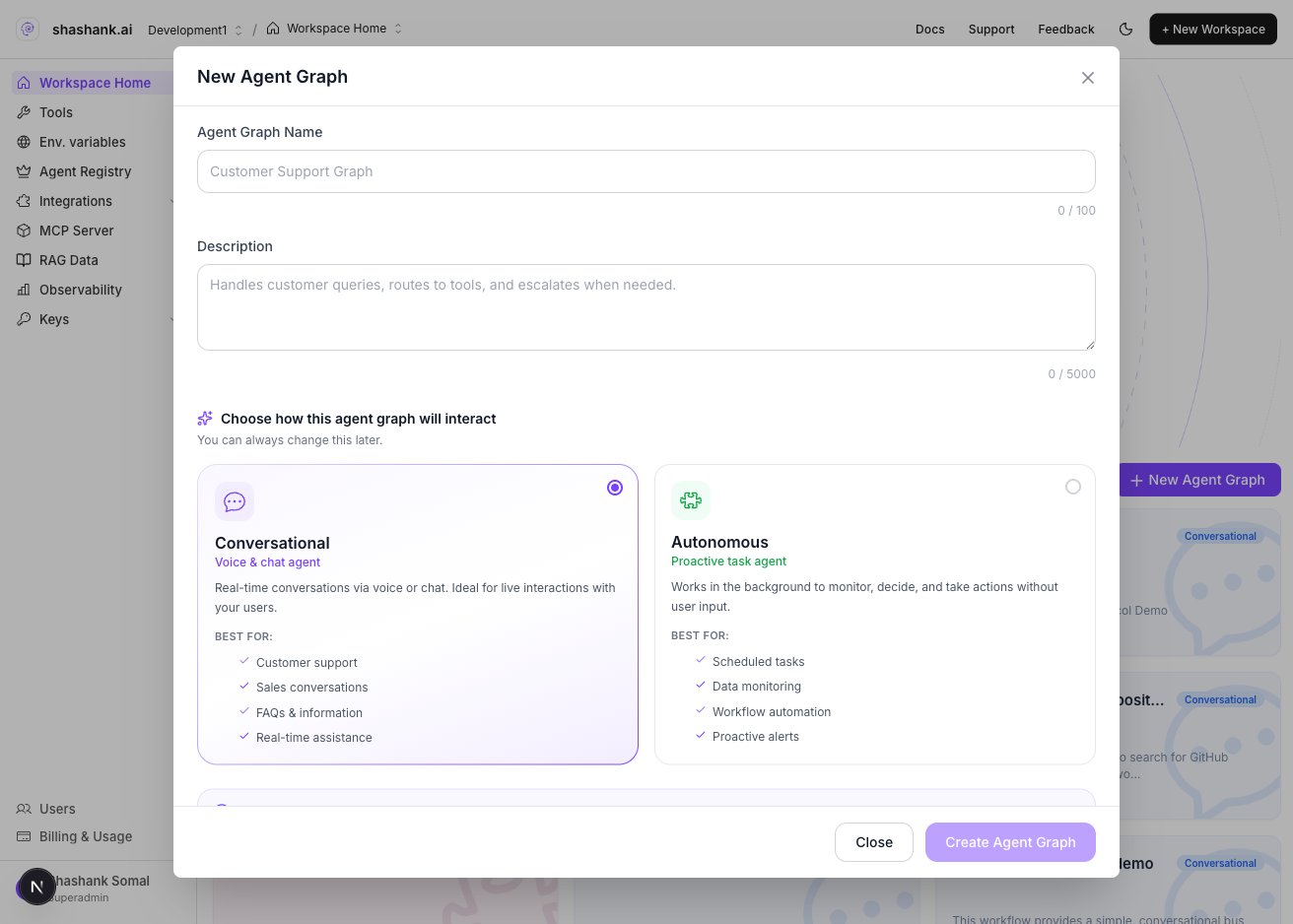 Workspace filters may still show an **Email** chip. New graphs only offer **Conversational** and **Autonomous**.
## Lifecycle at a glance
```mermaid theme={null}
flowchart LR
create[Create graph]
design[Design in Studio]
save[Save]
build[Build]
env[Assign environment]
ship[Deploy or A2A]
create --> design --> save --> build --> env --> ship
```
| Stage | Where | Outcome |
| --------------- | -------------------------------------- | ----------------------------------------- |
| **Design** | [Graph Studio](/graph-studio/overview) | Nodes, tools, RAG, variables |
| **Save** | Studio toolbar | Persisted draft graph |
| **Build** | Studio **Build** dialog | Immutable build with pinned tool versions |
| **Environment** | Build assignment drawer | DEV / UAT / PROD |
| **Deploy** | Studio **Deploy** dialog | Channel, Chat API, trigger, or A2A |
You can change graph type later from graph settings, but deploy targets differ — review [Deploy](/agents/deploy) before switching in production.
## Choose the right type
| Choose **Conversational** when… | Choose **Autonomous** when… |
| --------------------------------------------- | ------------------------------------------- |
| Users interact in real time via chat or voice | Work runs on a schedule or external webhook |
| You need channel or Chat API ingress | No live user session is required |
| Multi-turn dialogue drives the flow | Batch, monitoring, or pipeline logic |
## Related
* [Conversational Agent Graphs](/agents/conversational)
* [Autonomous Agent Graphs](/agents/autonomous)
* [Builds overview](/builds/overview)
* [Deploy](/agents/deploy)
* [Glossary](/reference/glossary-v2)
Workspace filters may still show an **Email** chip. New graphs only offer **Conversational** and **Autonomous**.
## Lifecycle at a glance
```mermaid theme={null}
flowchart LR
create[Create graph]
design[Design in Studio]
save[Save]
build[Build]
env[Assign environment]
ship[Deploy or A2A]
create --> design --> save --> build --> env --> ship
```
| Stage | Where | Outcome |
| --------------- | -------------------------------------- | ----------------------------------------- |
| **Design** | [Graph Studio](/graph-studio/overview) | Nodes, tools, RAG, variables |
| **Save** | Studio toolbar | Persisted draft graph |
| **Build** | Studio **Build** dialog | Immutable build with pinned tool versions |
| **Environment** | Build assignment drawer | DEV / UAT / PROD |
| **Deploy** | Studio **Deploy** dialog | Channel, Chat API, trigger, or A2A |
You can change graph type later from graph settings, but deploy targets differ — review [Deploy](/agents/deploy) before switching in production.
## Choose the right type
| Choose **Conversational** when… | Choose **Autonomous** when… |
| --------------------------------------------- | ------------------------------------------- |
| Users interact in real time via chat or voice | Work runs on a schedule or external webhook |
| You need channel or Chat API ingress | No live user session is required |
| Multi-turn dialogue drives the flow | Batch, monitoring, or pipeline logic |
## Related
* [Conversational Agent Graphs](/agents/conversational)
* [Autonomous Agent Graphs](/agents/autonomous)
* [Builds overview](/builds/overview)
* [Deploy](/agents/deploy)
* [Glossary](/reference/glossary-v2)