> ## Documentation Index
> Fetch the complete documentation index at: https://docs.phinite.ai/llms.txt
> Use this file to discover all available pages before exploring further.
# Registry agent nodes (Browse & Discovery)
> Attach Agent Registry agents to a master agent node in Browse mode or let Discovery auto-select agents by filter criteria.
Registry **agent nodes** connect a **master agent node** (task orchestrator) to agents published in the [**Agent Registry**](/agent-registry/overview). Unlike a standard agent node configured only with prompts and tools, a registry agent node references an **A2A registration**—either a **specific** agent (**Browse**) or a **dynamic set** matched at runtime (**Discovery**).
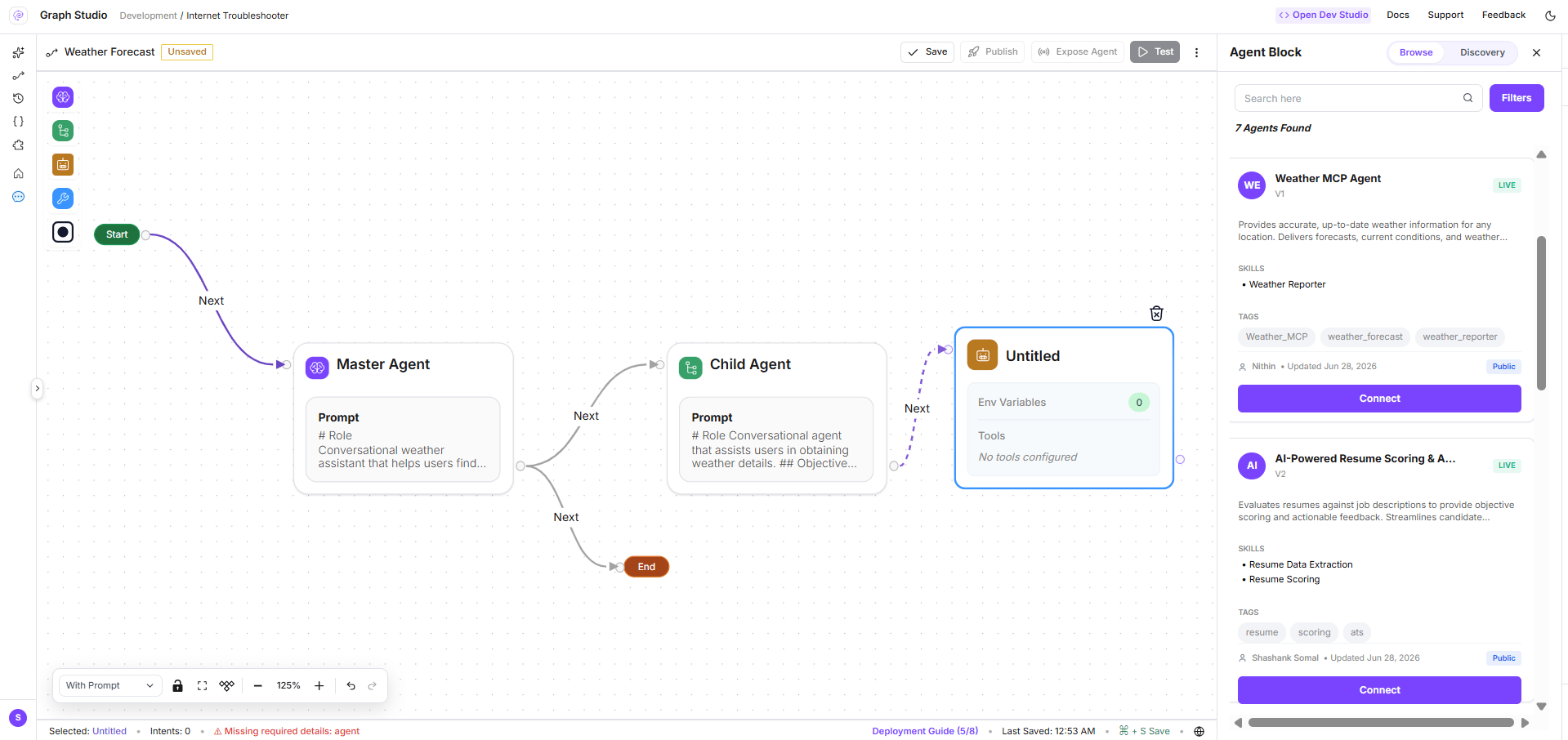 The browse panel title in the product reads **Agent Block**; documentation uses **Agent Node** for consistency with [**Graph Studio agent nodes**](/graph-studio/agent-node).
## When to use Browse vs Discovery
| Mode | Use when | Runtime behaviour |
| ------------- | --------------------------------------------- | ------------------------------------------------------------------------------------------------- |
| **Browse** | You know which registry agent to call | Master agent invokes the selected registration (fixed `a2aregistryid`, tools/env from that build) |
| **Discovery** | The right specialist agent depends on context | Master agent searches the registry using saved filters and attaches matching agents automatically |
Both modes require agents to be **exposed** in the registry with appropriate **visibility**, **skills**, and **tags**. See [**Expose your agent graph**](/agent-registry/expose-your-flow).
## Open the registry panel
1. Open **Graph Studio** for your project.
2. Add or select an **agent node** on the canvas under a **master (task) agent node**.
3. When the node is unconfigured—or when you open registry tooling—the **Browse / Discovery** panel appears on the right.
The panel loads registry data via **`GET /a2a-registry?workspaceid=...&orgid=...`**.
## Browse mode
In **Browse** mode:
1. Search and filter agents (visibility, deployed status, MIME modes, tags)—same dimensions as [**Agent Registry catalog**](/agent-registry/catalog).
2. Select an agent card from the list.
3. Review the **Agent Card preview** (hosted URL, skills, build status).
4. Click to **add** the agent to the canvas (or replace the current registry agent node).
After selection, configure **tools and environment variables** exported with that registry build in the **Configuration** sub-view. Browse nodes persist:
* `a2aregistryid`, `config_id`, `flowid`, `status`, `apikeyid`
* `agent_node_type: "browse"`
Validation requires a connected configuration (`config_id`) and satisfied tool/env requirements before save or publish.
## Discovery mode
In **Discovery** mode the master agent **does not** point at one fixed registration. Instead you define **Discovery filters**; at runtime the platform finds registry agents that match.
The browse panel title in the product reads **Agent Block**; documentation uses **Agent Node** for consistency with [**Graph Studio agent nodes**](/graph-studio/agent-node).
## When to use Browse vs Discovery
| Mode | Use when | Runtime behaviour |
| ------------- | --------------------------------------------- | ------------------------------------------------------------------------------------------------- |
| **Browse** | You know which registry agent to call | Master agent invokes the selected registration (fixed `a2aregistryid`, tools/env from that build) |
| **Discovery** | The right specialist agent depends on context | Master agent searches the registry using saved filters and attaches matching agents automatically |
Both modes require agents to be **exposed** in the registry with appropriate **visibility**, **skills**, and **tags**. See [**Expose your agent graph**](/agent-registry/expose-your-flow).
## Open the registry panel
1. Open **Graph Studio** for your project.
2. Add or select an **agent node** on the canvas under a **master (task) agent node**.
3. When the node is unconfigured—or when you open registry tooling—the **Browse / Discovery** panel appears on the right.
The panel loads registry data via **`GET /a2a-registry?workspaceid=...&orgid=...`**.
## Browse mode
In **Browse** mode:
1. Search and filter agents (visibility, deployed status, MIME modes, tags)—same dimensions as [**Agent Registry catalog**](/agent-registry/catalog).
2. Select an agent card from the list.
3. Review the **Agent Card preview** (hosted URL, skills, build status).
4. Click to **add** the agent to the canvas (or replace the current registry agent node).
After selection, configure **tools and environment variables** exported with that registry build in the **Configuration** sub-view. Browse nodes persist:
* `a2aregistryid`, `config_id`, `flowid`, `status`, `apikeyid`
* `agent_node_type: "browse"`
Validation requires a connected configuration (`config_id`) and satisfied tool/env requirements before save or publish.
## Discovery mode
In **Discovery** mode the master agent **does not** point at one fixed registration. Instead you define **Discovery filters**; at runtime the platform finds registry agents that match.
 ### Set Discovery filters
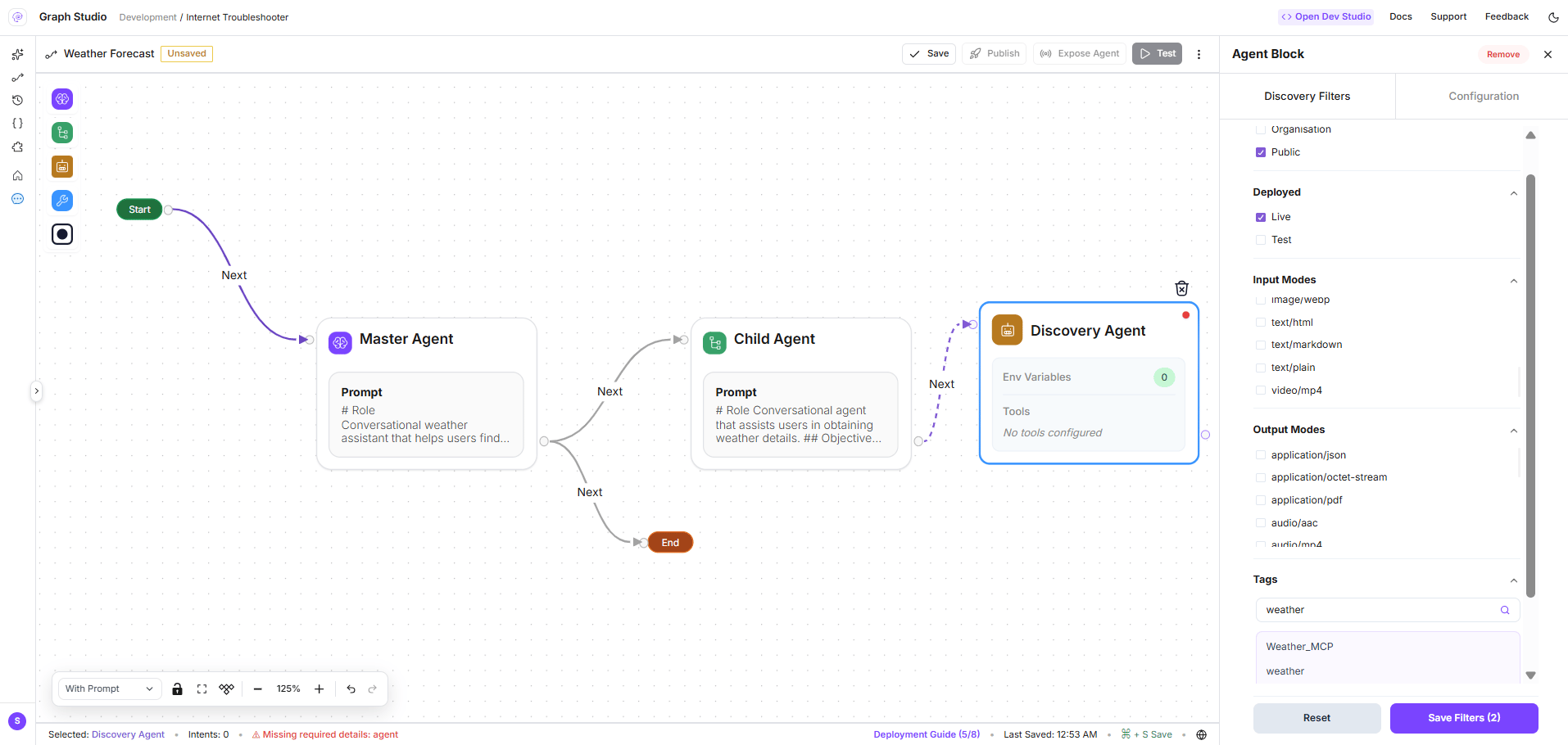
Configure filters parallel to the catalog sidebar:
| Filter | Purpose |
| ---------------- | ------------------------------------ |
| **Visibility** | Public and/or Organisation |
| **Deployed** | Live and/or Test |
| **Input Modes** | MIME types callers may send |
| **Output Modes** | MIME types agents may return |
| **Tags** | Discoverability tags on Agent Cards |
| **Auth** | Auth scheme filters where applicable |
Click **Save Filters** to create a **Discovery Agent** node on the canvas with:
* `agent_node_type: "discovery"`
* `discovery_filters` — saved filter object
* Default display name: **Discovery Agent**
Copy shown in the UI:
> In Discovery Mode, the Master Agent will find and attach the agents automatically based on your filter criteria.
### Configure Discovery API key
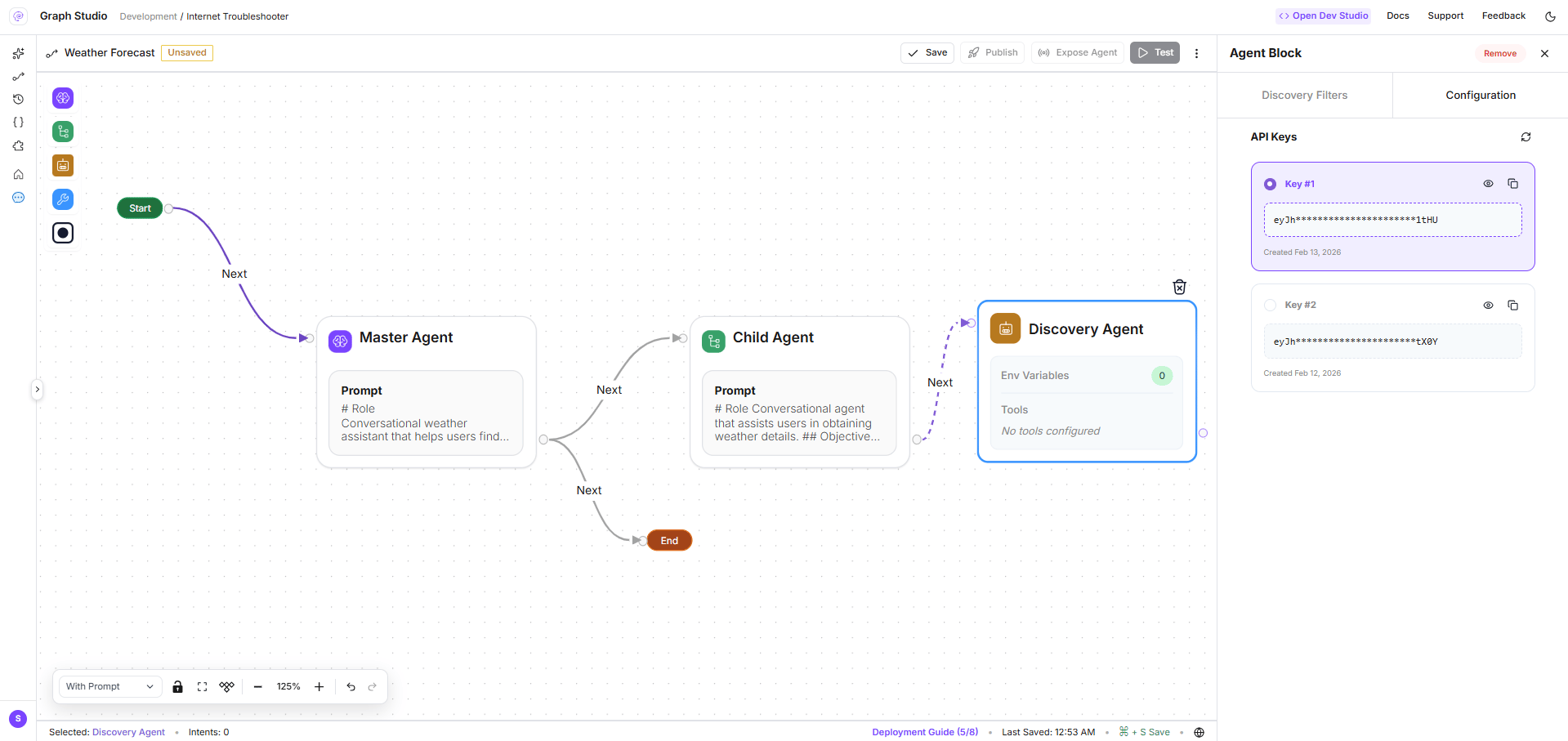
After saving filters, open the **Configuration** sub-tab to select the **API key** the master agent uses when calling discovered agents (`apikeyid` on the node).
### Set Discovery filters
Configure filters parallel to the catalog sidebar:
| Filter | Purpose |
| ---------------- | ------------------------------------ |
| **Visibility** | Public and/or Organisation |
| **Deployed** | Live and/or Test |
| **Input Modes** | MIME types callers may send |
| **Output Modes** | MIME types agents may return |
| **Tags** | Discoverability tags on Agent Cards |
| **Auth** | Auth scheme filters where applicable |
Click **Save Filters** to create a **Discovery Agent** node on the canvas with:
* `agent_node_type: "discovery"`
* `discovery_filters` — saved filter object
* Default display name: **Discovery Agent**
Copy shown in the UI:
> In Discovery Mode, the Master Agent will find and attach the agents automatically based on your filter criteria.
### Configure Discovery API key
After saving filters, open the **Configuration** sub-tab to select the **API key** the master agent uses when calling discovered agents (`apikeyid` on the node).
 ### One Discovery node per master agent
Only **one Discovery** registry agent node is allowed per **master (task) agent node**. If you try to add a second, the Studio shows **Discovery Already Connected** (or the Discovery tab is disabled with *Only one discovery allowed per master agent node*).
Discovery nodes **skip** the standard per-tool configuration validation used in Browse mode—the filter set defines what may be attached at runtime.
## Persisted node fields
When you save or publish the agent graph, registry agent nodes include:
| Field | Browse | Discovery |
| ------------------- | ---------------------- | -------------------------- |
| `agent_node_type` | `"browse"` | `"discovery"` |
| `a2aregistryid` | Selected registration | — |
| `config_id` | Build tool/env config | — |
| `discovery_filters` | — | Saved filter object |
| `apikeyid` | Optional | Required for runtime calls |
| `flowid`, `status` | From selected build | — |
| `integration_link` | A2A endpoint reference | — |
## Permissions
* Configure registry nodes: **`flow_gen.studio.save_flow`** and related Graph Studio permissions
* Load registry list: **`assistants.flows:read`**
## Related pages
Full workspace search and filters.
Hosted URLs and visibility at invoke time.
Prompts, RAG, tools, and variables on standard agent nodes.
### One Discovery node per master agent
Only **one Discovery** registry agent node is allowed per **master (task) agent node**. If you try to add a second, the Studio shows **Discovery Already Connected** (or the Discovery tab is disabled with *Only one discovery allowed per master agent node*).
Discovery nodes **skip** the standard per-tool configuration validation used in Browse mode—the filter set defines what may be attached at runtime.
## Persisted node fields
When you save or publish the agent graph, registry agent nodes include:
| Field | Browse | Discovery |
| ------------------- | ---------------------- | -------------------------- |
| `agent_node_type` | `"browse"` | `"discovery"` |
| `a2aregistryid` | Selected registration | — |
| `config_id` | Build tool/env config | — |
| `discovery_filters` | — | Saved filter object |
| `apikeyid` | Optional | Required for runtime calls |
| `flowid`, `status` | From selected build | — |
| `integration_link` | A2A endpoint reference | — |
## Permissions
* Configure registry nodes: **`flow_gen.studio.save_flow`** and related Graph Studio permissions
* Load registry list: **`assistants.flows:read`**
## Related pages
Full workspace search and filters.
Hosted URLs and visibility at invoke time.
Prompts, RAG, tools, and variables on standard agent nodes.