> ## Documentation Index
> Fetch the complete documentation index at: https://docs.phinite.ai/llms.txt
> Use this file to discover all available pages before exploring further.
# Agent Registry overview
> Publish agent graphs as discoverable A2A agents, browse the registry, and compose multi-agent workflows with Browse and Discovery modes.
 ## What the Agent Registry is
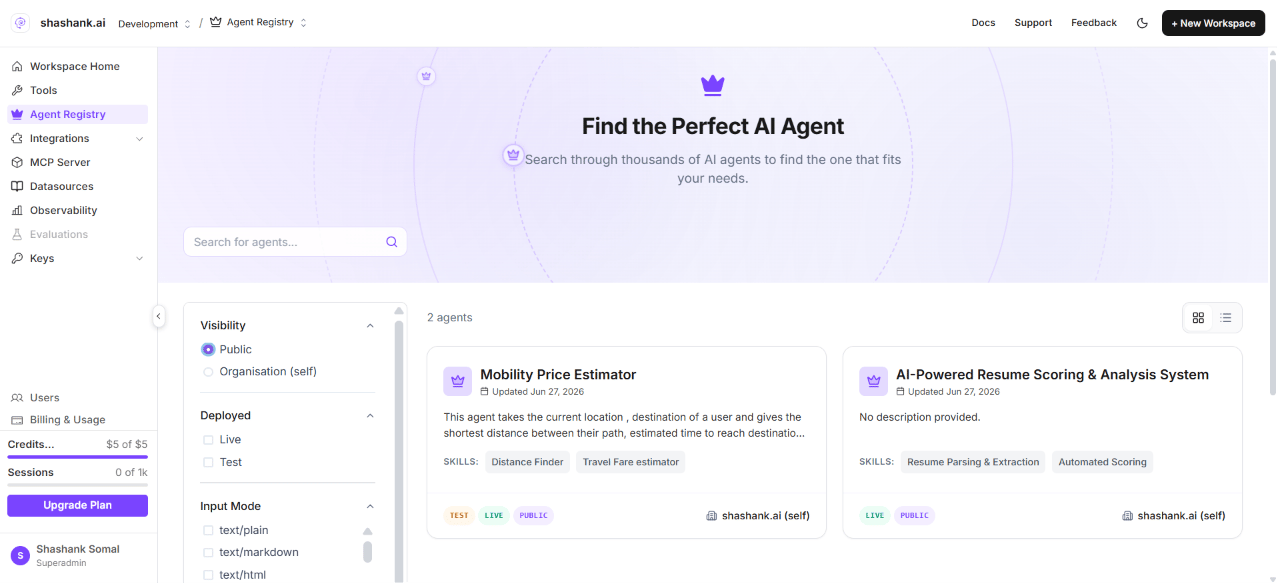
The **Agent Registry** is your workspace catalog of **Agent Cards**—registered metadata and hosted endpoints for agent graphs you expose over the [**Agent-to-Agent (A2A) protocol**](https://a2a-protocol.org/latest/specification/). Each registry entry ties a published **agent graph build** to skills, discoverability tags, visibility, and a **hosted A2A URL** that external systems and other agents can call.
Use Agent Registry when you want to:
* **Publish** an agent graph as a callable A2A service (not only run it inside a single assistant).
* **Discover** agents across your organisation—or, when visibility is public, from compatible clients with a valid API key.
* **Compose** multi-agent workflows by attaching registry agents to a **master agent node** in **Browse** or **Discovery** mode.
* **Call** registry agents from **Claude** using the [Phinite Connector](/agent-registry/invoke-a2a-from-claude) (`discover_agents`, `call_agent`, and credential setup).
## End-to-end workflow
```mermaid theme={null}
graph LR
design[Design in Graph Studio]
publish[Publish agent graph]
expose[Expose as External Agent]
registry[Agent Registry catalog]
consume[Browse or Discovery on canvas]
live[Promote build to Live]
design --> publish --> expose --> registry
registry --> consume
registry --> live
```
| Step | Where | Outcome |
| ---------- | ------------------------------------------------------------ | ------------------------------------------------------------------------ |
| 1. Design | [Graph Studio](/graph-studio/overview) | Agent graph with prompts, tools, and routing |
| 2. Publish | [Publishing](/graph-studio/publishing) | Versioned build ready to expose |
| 3. Expose | [Expose your flow](/agent-registry/expose-your-flow) | Agent Card + registry ID + **test** hosted URL |
| 4. Browse | [Agent Registry catalog](/agent-registry/catalog) | Search, filter, inspect skills and endpoints |
| 5. Compose | [Registry agent nodes](/agent-registry/registry-agent-nodes) | Call a specific agent (**Browse**) or auto-match filters (**Discovery**) |
| 6. Promote | [Agent Cards](/agent-registry/agent-cards) | One **live** build per agent graph per workspace |
## Access and environment
Agent Registry sidebar entry, **Configure Agent** in Graph Studio, and related expose flows are available when the app runs in a **local or dev** environment (`NEXT_PUBLIC_APP_ENV` is `local` or `dev`, or `NODE_ENV` is `development`). Production rollout may differ—confirm with your administrator.
**Sidebar permission:** `workspace.sidebar.agent_registry` (legacy alias `workspace.sidebar:agent_registry`).
**Routes:**
* Workspace catalog: `/{organisation}/workspace/{workspaceId}/agent-registry`
* Project Agent Cards (builds): `/{organisation}/workspace/{workspaceId}/projects/{projectId}/agent-cards`
* Graph Studio (expose entry): `.../projects/{projectId}/studio`
## Terminology
Phinite maps industry A2A vocabulary to product labels as follows:
| Industry / A2A term | Phinite UI / API | Meaning |
| ----------------------------------- | ----------------------------------------------- | --------------------------------------------------------------------------------------- |
| **Agent Card** | Agent Card (wizard step 3) | Public identity: name, description, skills, tags, visibility |
| **Agent Registry** | Agent Registry sidebar | Workspace catalog of registered A2A agents |
| **A2A endpoint / Hosted agent URL** | `/api/v1/ai/a2a/{flowId}` or `.../{registryId}` | Callable agent over the A2A protocol |
| **Skills** | Skills in wizard | Callable capabilities with input/output MIME modes |
| **Discoverability tags** | Discoverability Tags | Metadata for search and Discovery filters |
| **Deployment status** | Test / Live badges | `test` = validation build; `live` = production (one live per flow per workspace) |
| **Visibility** | Public / Organisation | `public` = any A2A client with a valid API key; `organization` = same organisation only |
| **Browse mode** | Browse tab on agent node | Master agent calls a **specific** registry agent |
| **Discovery mode** | Discovery tab on agent node | Master agent **auto-selects** agents matching saved filters at runtime |
Some canvas labels still say **Agent Block** (for example in the browse panel); documentation uses **Agent Node** as the preferred term. See the [**Agent Registry glossary**](/agent-registry/glossary) for MIME modes and API field names.
## Next steps
Install the Phinite Connector, discover agents, and run tasks from Claude.
Register an agent graph with the three-step Expose wizard.
Browse vs Discovery on the Graph Studio canvas.
Search, filter, and inspect registry entries.
Manage test and live builds; push to production.
Hosted URL patterns, auth, and promote-live.
Industry terms, MIME modes, and UI label mapping.
## What the Agent Registry is
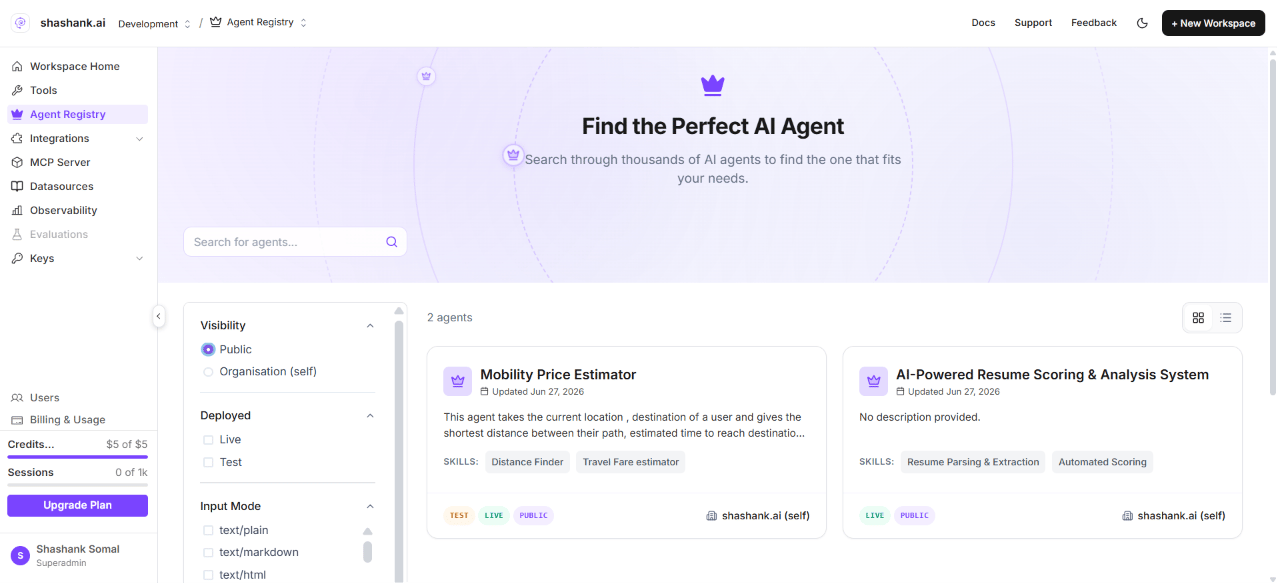
The **Agent Registry** is your workspace catalog of **Agent Cards**—registered metadata and hosted endpoints for agent graphs you expose over the [**Agent-to-Agent (A2A) protocol**](https://a2a-protocol.org/latest/specification/). Each registry entry ties a published **agent graph build** to skills, discoverability tags, visibility, and a **hosted A2A URL** that external systems and other agents can call.
Use Agent Registry when you want to:
* **Publish** an agent graph as a callable A2A service (not only run it inside a single assistant).
* **Discover** agents across your organisation—or, when visibility is public, from compatible clients with a valid API key.
* **Compose** multi-agent workflows by attaching registry agents to a **master agent node** in **Browse** or **Discovery** mode.
* **Call** registry agents from **Claude** using the [Phinite Connector](/agent-registry/invoke-a2a-from-claude) (`discover_agents`, `call_agent`, and credential setup).
## End-to-end workflow
```mermaid theme={null}
graph LR
design[Design in Graph Studio]
publish[Publish agent graph]
expose[Expose as External Agent]
registry[Agent Registry catalog]
consume[Browse or Discovery on canvas]
live[Promote build to Live]
design --> publish --> expose --> registry
registry --> consume
registry --> live
```
| Step | Where | Outcome |
| ---------- | ------------------------------------------------------------ | ------------------------------------------------------------------------ |
| 1. Design | [Graph Studio](/graph-studio/overview) | Agent graph with prompts, tools, and routing |
| 2. Publish | [Publishing](/graph-studio/publishing) | Versioned build ready to expose |
| 3. Expose | [Expose your flow](/agent-registry/expose-your-flow) | Agent Card + registry ID + **test** hosted URL |
| 4. Browse | [Agent Registry catalog](/agent-registry/catalog) | Search, filter, inspect skills and endpoints |
| 5. Compose | [Registry agent nodes](/agent-registry/registry-agent-nodes) | Call a specific agent (**Browse**) or auto-match filters (**Discovery**) |
| 6. Promote | [Agent Cards](/agent-registry/agent-cards) | One **live** build per agent graph per workspace |
## Access and environment
Agent Registry sidebar entry, **Configure Agent** in Graph Studio, and related expose flows are available when the app runs in a **local or dev** environment (`NEXT_PUBLIC_APP_ENV` is `local` or `dev`, or `NODE_ENV` is `development`). Production rollout may differ—confirm with your administrator.
**Sidebar permission:** `workspace.sidebar.agent_registry` (legacy alias `workspace.sidebar:agent_registry`).
**Routes:**
* Workspace catalog: `/{organisation}/workspace/{workspaceId}/agent-registry`
* Project Agent Cards (builds): `/{organisation}/workspace/{workspaceId}/projects/{projectId}/agent-cards`
* Graph Studio (expose entry): `.../projects/{projectId}/studio`
## Terminology
Phinite maps industry A2A vocabulary to product labels as follows:
| Industry / A2A term | Phinite UI / API | Meaning |
| ----------------------------------- | ----------------------------------------------- | --------------------------------------------------------------------------------------- |
| **Agent Card** | Agent Card (wizard step 3) | Public identity: name, description, skills, tags, visibility |
| **Agent Registry** | Agent Registry sidebar | Workspace catalog of registered A2A agents |
| **A2A endpoint / Hosted agent URL** | `/api/v1/ai/a2a/{flowId}` or `.../{registryId}` | Callable agent over the A2A protocol |
| **Skills** | Skills in wizard | Callable capabilities with input/output MIME modes |
| **Discoverability tags** | Discoverability Tags | Metadata for search and Discovery filters |
| **Deployment status** | Test / Live badges | `test` = validation build; `live` = production (one live per flow per workspace) |
| **Visibility** | Public / Organisation | `public` = any A2A client with a valid API key; `organization` = same organisation only |
| **Browse mode** | Browse tab on agent node | Master agent calls a **specific** registry agent |
| **Discovery mode** | Discovery tab on agent node | Master agent **auto-selects** agents matching saved filters at runtime |
Some canvas labels still say **Agent Block** (for example in the browse panel); documentation uses **Agent Node** as the preferred term. See the [**Agent Registry glossary**](/agent-registry/glossary) for MIME modes and API field names.
## Next steps
Install the Phinite Connector, discover agents, and run tasks from Claude.
Register an agent graph with the three-step Expose wizard.
Browse vs Discovery on the Graph Studio canvas.
Search, filter, and inspect registry entries.
Manage test and live builds; push to production.
Hosted URL patterns, auth, and promote-live.
Industry terms, MIME modes, and UI label mapping.