> ## Documentation Index
> Fetch the complete documentation index at: https://docs.phinite.ai/llms.txt
> Use this file to discover all available pages before exploring further.
# Browse the Agent Registry
> Search, filter, and inspect organisation and public-facing agent listings in the workspace Agent Registry.
## Open Agent Registry
In the workspace sidebar, open **Agent Registry** when your organisation grants **`workspace.sidebar.agent_registry`**.
**Route:** `/{organisation}/workspace/{workspaceId}/agent-registry`
The same registry data powers **Browse** mode on agent nodes in Graph Studio. The workspace page is the full catalog experience with search, filters, and detail views.
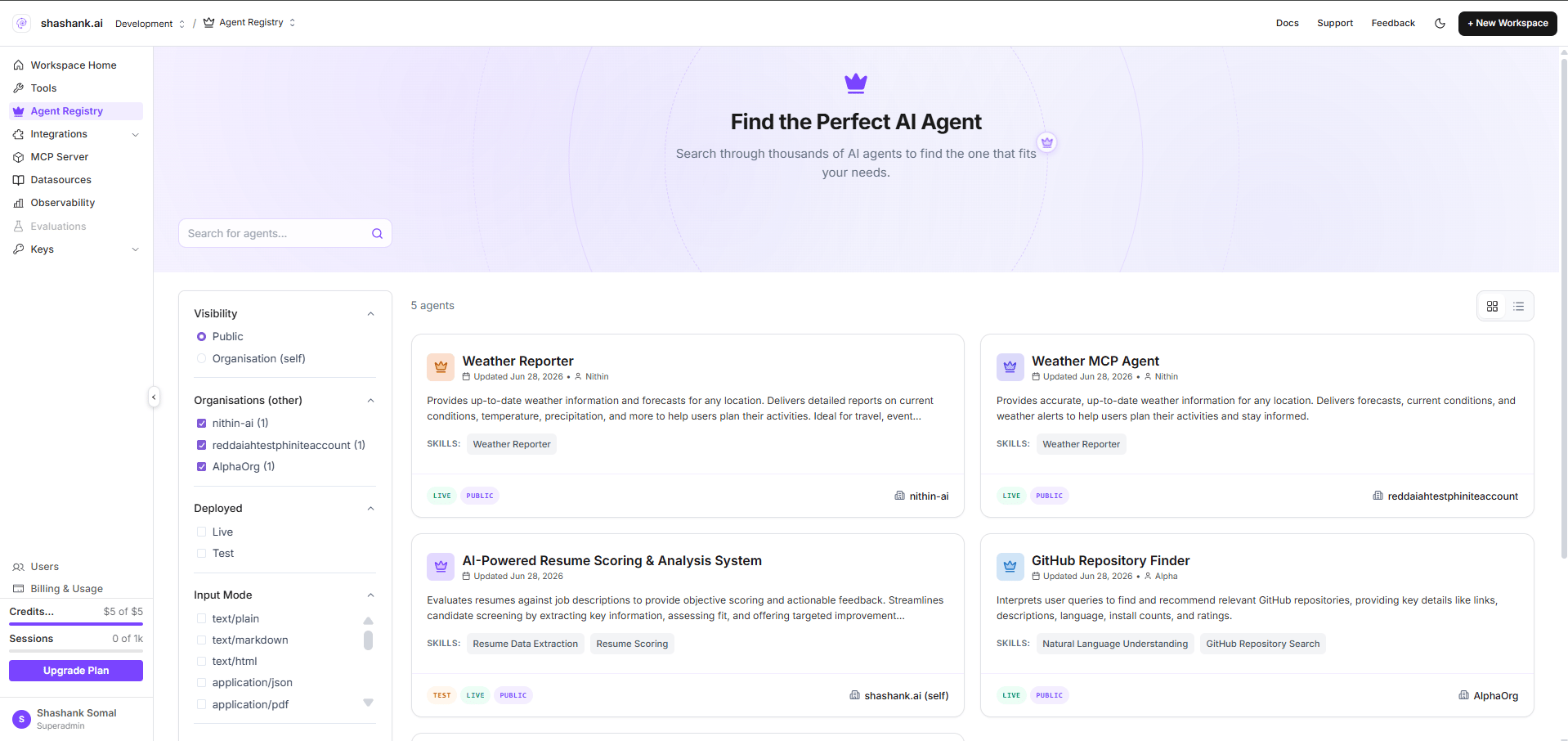 ## Page layout
| Area | Description |
| ------------------ | -------------------------------------------------------------------------------------- |
| **Hero** | Heading *Find the Perfect AI Agent* with subtitle and agent count |
| **Search** | *Search for agents...* — filters by name, summary, tags, and related metadata |
| **Filter sidebar** | Visibility, deployed status, input/output MIME modes, and tags |
| **View toggle** | Grid or list layout |
| **Detail** | Selecting an agent opens a detail view (skills, status, visibility, copyable endpoint) |
### Filter dimensions
| Filter | Options | Purpose |
| --------------- | -------------------------------------------------- | ----------------------------- |
| **Visibility** | Public, Organisation | Match Agent Card visibility |
| **Deployed** | Live, Test | Match registry build status |
| **Input Mode** | MIME types (e.g. `text/plain`, `application/json`) | Skill input compatibility |
| **Output Mode** | MIME types | Skill output compatibility |
| **Tags** | Discoverability tags from Agent Cards | Narrow by topic or capability |
Filters apply **client-side** on the loaded registry list in addition to API query parameters described below.
## Organisation vs public listings
The UI distinguishes **Organisation** and **Public** catalog views internally (filter logic and API params). There is no separate **Sample** demo tab in the current product.
| View | API behaviour | What you see |
| ------------------- | -------------------------------------------------------------- | ------------------------------------------------------- |
| **Organisation** | `GET /a2a-registry?workspaceid=...&orgid=...&pagination=false` | Test and live builds registered under your organisation |
| **Public-oriented** | Same request with **`status=live`** | Live builds only—intended for catalogue-style discovery |
Public-oriented filtering currently emphasises **`status=live`** at the API. **Visibility** (`public` vs `organization`) is stored on each registration and enforced at **invoke time** by the gateway; the catalog may show mixed visibility until you apply the **Public** visibility filter in the sidebar.
## Agent cards in the list
Each card typically shows:
* Agent name and description (from **Agent Card**)
* Deployment badge (**Test** or **Live**)
* Visibility (**Public** or **Organisation**)
* Skills summary and discoverability tags
* Hosted **A2A URL** (live builds omit the registry ID in the path—see [**Endpoints & lifecycle**](/agent-registry/endpoints-and-lifecycle))
## Page layout
| Area | Description |
| ------------------ | -------------------------------------------------------------------------------------- |
| **Hero** | Heading *Find the Perfect AI Agent* with subtitle and agent count |
| **Search** | *Search for agents...* — filters by name, summary, tags, and related metadata |
| **Filter sidebar** | Visibility, deployed status, input/output MIME modes, and tags |
| **View toggle** | Grid or list layout |
| **Detail** | Selecting an agent opens a detail view (skills, status, visibility, copyable endpoint) |
### Filter dimensions
| Filter | Options | Purpose |
| --------------- | -------------------------------------------------- | ----------------------------- |
| **Visibility** | Public, Organisation | Match Agent Card visibility |
| **Deployed** | Live, Test | Match registry build status |
| **Input Mode** | MIME types (e.g. `text/plain`, `application/json`) | Skill input compatibility |
| **Output Mode** | MIME types | Skill output compatibility |
| **Tags** | Discoverability tags from Agent Cards | Narrow by topic or capability |
Filters apply **client-side** on the loaded registry list in addition to API query parameters described below.
## Organisation vs public listings
The UI distinguishes **Organisation** and **Public** catalog views internally (filter logic and API params). There is no separate **Sample** demo tab in the current product.
| View | API behaviour | What you see |
| ------------------- | -------------------------------------------------------------- | ------------------------------------------------------- |
| **Organisation** | `GET /a2a-registry?workspaceid=...&orgid=...&pagination=false` | Test and live builds registered under your organisation |
| **Public-oriented** | Same request with **`status=live`** | Live builds only—intended for catalogue-style discovery |
Public-oriented filtering currently emphasises **`status=live`** at the API. **Visibility** (`public` vs `organization`) is stored on each registration and enforced at **invoke time** by the gateway; the catalog may show mixed visibility until you apply the **Public** visibility filter in the sidebar.
## Agent cards in the list
Each card typically shows:
* Agent name and description (from **Agent Card**)
* Deployment badge (**Test** or **Live**)
* Visibility (**Public** or **Organisation**)
* Skills summary and discoverability tags
* Hosted **A2A URL** (live builds omit the registry ID in the path—see [**Endpoints & lifecycle**](/agent-registry/endpoints-and-lifecycle))
 Selecting a card opens a detail panel or modal where you can copy the endpoint and review build metadata.
## API reference (listing)
The catalog loads registry rows via the gateway:
```text theme={null}
GET /api/v1/a2a-registry?workspaceid={id}&orgid={id}&pagination=false
GET /api/v1/a2a-registry?workspaceid={id}&orgid={id}&status=live&pagination=false
```
Optional query params supported by the API include `flowid`, `visibility`, `tag`, `input_mode`, `output_mode`, and paginated `page`/`limit`. The workspace page currently loads the full list with `pagination=false` for client-side search and filters.
## Permissions
* **View registry:** `assistants.flows:read` (via gateway auth)
* **Sidebar entry:** `workspace.sidebar.agent_registry`
## Related pages
Create a new registry entry from Graph Studio.
Attach catalog agents on the canvas (Browse mode).
Selecting a card opens a detail panel or modal where you can copy the endpoint and review build metadata.
## API reference (listing)
The catalog loads registry rows via the gateway:
```text theme={null}
GET /api/v1/a2a-registry?workspaceid={id}&orgid={id}&pagination=false
GET /api/v1/a2a-registry?workspaceid={id}&orgid={id}&status=live&pagination=false
```
Optional query params supported by the API include `flowid`, `visibility`, `tag`, `input_mode`, `output_mode`, and paginated `page`/`limit`. The workspace page currently loads the full list with `pagination=false` for client-side search and filters.
## Permissions
* **View registry:** `assistants.flows:read` (via gateway auth)
* **Sidebar entry:** `workspace.sidebar.agent_registry`
## Related pages
Create a new registry entry from Graph Studio.
Attach catalog agents on the canvas (Browse mode).