> ## Documentation Index
> Fetch the complete documentation index at: https://docs.phinite.ai/llms.txt
> Use this file to discover all available pages before exploring further.
# Agent Cards & builds
> Manage A2A registry builds per agent graph, compare test and live deployments, and promote builds to production.
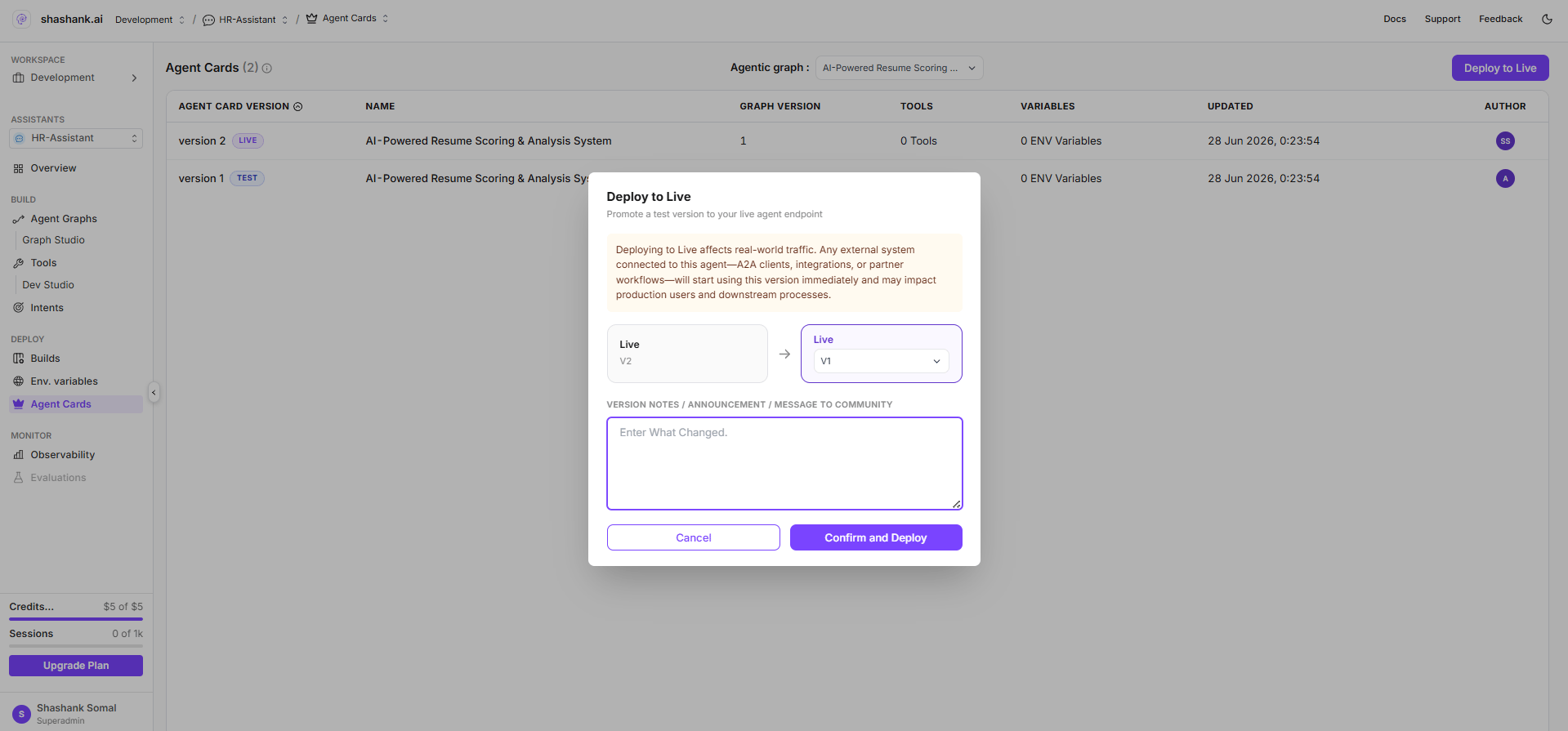
**Agent Cards** is the project-scoped view of **A2A registry builds** for each exposed agent graph. Use it to inspect build history, compare **test** and **live** deployments, and **promote** a build to production.
 ## Open Agent Cards
**Route:** `/{organisation}/workspace/{workspaceId}/projects/{projectId}/agent-cards`
The page appears in the **project sidebar** for conversational and voice assistants when **`workspace.sidebar.agent_registry`** is granted (same permission as workspace **Agent Registry**). Like other registry features, it is typically visible in **local/dev** environments.
You can also reach Agent Cards from Graph Studio via **Configure Agent** → **Expose as Agent** → **See Agent builds**.
## Page layout
| Element | Description |
| -------------------------- | -------------------------------------------------------------------------------------------------------- |
| **Title** | **Agent Cards** with total build count |
| **Agentic graph** dropdown | Filter builds by agent graph (`flowid`); options from **`GET /a2a-registry?flow_list=true`** |
| **Build table** | Rows per registry build: build number, status, name, description, tools/env counts, updated date, author |
| **Push To Prod** | Opens promote modal to move a **test** build to **live** |
While data loads, the page shows *Loading builds...*.
## Build rows
Each row represents one **`POST /a2a-registry`** registration (one expose action). Key fields:
| Column / field | Source | Notes |
| ---------------------- | ----------------------------- | -------------------------------------------- |
| **Build number** | `build_no` | Auto-incremented per workspace + agent graph |
| **Status** | `test` or `live` | Badge: **TEST** or **LIVE** |
| **Name / description** | `agent_card` | Agent Card from expose wizard |
| **Tools / env** | `tool_config`, `env_variable` | Exported configuration counts |
| **Registry ID** | `a2aregistryid` | Used in test hosted URLs |
Builds sort by **most recently updated** first.
## Test vs live
| Status | Purpose | Hosted URL |
| -------- | ----------------------------------------------------------------------------------- | ----------------------------------------------- |
| **Test** | Validate Agent Card, skills, and integrations before broad use | `{gateway}/api/v1/ai/a2a/{flowId}/{registryId}` |
| **Live** | Production endpoint for the agent graph (only one live row per graph per workspace) | `{gateway}/api/v1/ai/a2a/{flowId}` |
See [**Endpoints & lifecycle**](/agent-registry/endpoints-and-lifecycle) for URL and auth details.
## Promote to production
1. Click **Push To Prod** (tooltip: *Push the selected build to production*).
2. In the modal, select the **test** build to promote.
3. Confirm promotion.
The app calls:
```text theme={null}
PUT /api/v1/a2a-registry/{a2aregistryid}/promote-live
```
**Promotion rules:**
* The chosen build becomes **`live`**.
* Any previous **live** build for the same agent graph in the workspace is demoted to **`test`**.
* Visibility on the Agent Card is unchanged by promotion—only deployment status updates.
After promotion, refresh the table and verify the **live** hosted URL on the build row or in [**Agent Registry**](/agent-registry/catalog).
## Create a new build
New builds are created from Graph Studio—not from the Agent Cards page directly:
1. [**Publish**](/graph-studio/publishing) the agent graph.
2. [**Expose as External Agent**](/agent-registry/expose-your-flow) via **Configure Agent** → **Create New Build**.
3. Return to Agent Cards to compare the new **test** row with existing builds.
## Permissions
| Action | Permission |
| --------------- | ---------------------------------- |
| View builds | `assistants.flows:read` |
| Promote to live | `assistants.flows:update` |
| Sidebar entry | `workspace.sidebar.agent_registry` |
## Related pages
Create a new test build and Agent Card.
URL patterns and API reference.
## Open Agent Cards
**Route:** `/{organisation}/workspace/{workspaceId}/projects/{projectId}/agent-cards`
The page appears in the **project sidebar** for conversational and voice assistants when **`workspace.sidebar.agent_registry`** is granted (same permission as workspace **Agent Registry**). Like other registry features, it is typically visible in **local/dev** environments.
You can also reach Agent Cards from Graph Studio via **Configure Agent** → **Expose as Agent** → **See Agent builds**.
## Page layout
| Element | Description |
| -------------------------- | -------------------------------------------------------------------------------------------------------- |
| **Title** | **Agent Cards** with total build count |
| **Agentic graph** dropdown | Filter builds by agent graph (`flowid`); options from **`GET /a2a-registry?flow_list=true`** |
| **Build table** | Rows per registry build: build number, status, name, description, tools/env counts, updated date, author |
| **Push To Prod** | Opens promote modal to move a **test** build to **live** |
While data loads, the page shows *Loading builds...*.
## Build rows
Each row represents one **`POST /a2a-registry`** registration (one expose action). Key fields:
| Column / field | Source | Notes |
| ---------------------- | ----------------------------- | -------------------------------------------- |
| **Build number** | `build_no` | Auto-incremented per workspace + agent graph |
| **Status** | `test` or `live` | Badge: **TEST** or **LIVE** |
| **Name / description** | `agent_card` | Agent Card from expose wizard |
| **Tools / env** | `tool_config`, `env_variable` | Exported configuration counts |
| **Registry ID** | `a2aregistryid` | Used in test hosted URLs |
Builds sort by **most recently updated** first.
## Test vs live
| Status | Purpose | Hosted URL |
| -------- | ----------------------------------------------------------------------------------- | ----------------------------------------------- |
| **Test** | Validate Agent Card, skills, and integrations before broad use | `{gateway}/api/v1/ai/a2a/{flowId}/{registryId}` |
| **Live** | Production endpoint for the agent graph (only one live row per graph per workspace) | `{gateway}/api/v1/ai/a2a/{flowId}` |
See [**Endpoints & lifecycle**](/agent-registry/endpoints-and-lifecycle) for URL and auth details.
## Promote to production
1. Click **Push To Prod** (tooltip: *Push the selected build to production*).
2. In the modal, select the **test** build to promote.
3. Confirm promotion.
The app calls:
```text theme={null}
PUT /api/v1/a2a-registry/{a2aregistryid}/promote-live
```
**Promotion rules:**
* The chosen build becomes **`live`**.
* Any previous **live** build for the same agent graph in the workspace is demoted to **`test`**.
* Visibility on the Agent Card is unchanged by promotion—only deployment status updates.
After promotion, refresh the table and verify the **live** hosted URL on the build row or in [**Agent Registry**](/agent-registry/catalog).
## Create a new build
New builds are created from Graph Studio—not from the Agent Cards page directly:
1. [**Publish**](/graph-studio/publishing) the agent graph.
2. [**Expose as External Agent**](/agent-registry/expose-your-flow) via **Configure Agent** → **Create New Build**.
3. Return to Agent Cards to compare the new **test** row with existing builds.
## Permissions
| Action | Permission |
| --------------- | ---------------------------------- |
| View builds | `assistants.flows:read` |
| Promote to live | `assistants.flows:update` |
| Sidebar entry | `workspace.sidebar.agent_registry` |
## Related pages
Create a new test build and Agent Card.
URL patterns and API reference.